“Simple Gmail Notes”的产品徽标图片

Simple Gmail Notes

bart.solutions
精选
4.6(

799 个评分

)
Simple Gmail Notes的项目媒体 4(屏幕截图)
Simple Gmail Notes的项目媒体 5(屏幕截图)
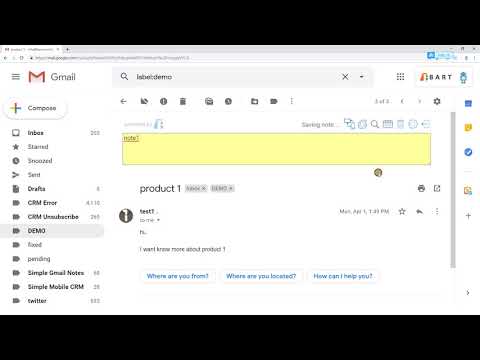
产品视频缩略图
Simple Gmail Notes的项目媒体 2(屏幕截图)
Simple Gmail Notes的项目媒体 3(屏幕截图)
Simple Gmail Notes的项目媒体 4(屏幕截图)
Simple Gmail Notes的项目媒体 5(屏幕截图)
产品视频缩略图
Simple Gmail Notes的项目媒体 2(屏幕截图)
产品视频缩略图
Simple Gmail Notes的项目媒体 2(屏幕截图)
Simple Gmail Notes的项目媒体 3(屏幕截图)
Simple Gmail Notes的项目媒体 4(屏幕截图)
Simple Gmail Notes的项目媒体 5(屏幕截图)

概述

给Gmail和Inbox中的电子邮件添加备注。

- 将笔记存储在您自己的Google云端硬盘中 - 添加到日历/设置颜色/搜索笔记 - 电子邮件摘要页面中的摘要 - 100%免费和开源 - 支持Gmail和Google收件箱 - 支持Chrome和Firefox - 最低权限 ** 如何使用 ** https://www.bart.com.hk/how-to-use-simple-gmail-notes/

4.6 星(5 星制)799 个评分

详细了解结果和评价。

详情

  • 版本
    2.9.23.9
  • 上次更新日期
    2026年4月2日
  • 大小
    1.15MiB
  • 语言
    48 种语言
  • 开发者
    BART SOLUTIONS LIMITED
    EASEY COMMERCIAL BUILDING 253-261 HENNESSY ROAD WANCHAI 001 Hong Kong
    网站
    邮箱
    walty@bart.com.hk
  • 非交易者
    该开发者尚未将自己标识为交易者。欧盟地区消费者须知:消费者权利可能不适用于您与该开发者达成的合约。

隐私权

管理扩展程序并了解它们在组织中的使用情况
该开发者已披露,此产品不会收集或使用您的数据。 如需了解详情,请参阅开发者的privacy policy

该开发者已声明,您的数据:

  • 不会因未获批准的用途出售给第三方
  • 不会为实现与产品核心功能无关的目的而使用或转移
  • 不会为确定信用度或放贷目的而使用或转移

支持

若有任何疑问、建议或问题,请访问开发者的支持网站

相关

Email Reply Status

4.4

Stop wasting time sorting through emails: Instantly know which of your emails needs a reply back.

Gmail Message Preview by cloudHQ

4.0

Preview emails in inbox.

Share and attach files in Gmail™ by cloudHQ

4.8

Attach and share files effortlessly from OneDrive, Dropbox, Box, Google Drive, Evernote and many more.

ActiveInbox: Organize Gmail™ tasks

4.7

Overwhelmed by too many to-dos in your inbox? Turn Gmail into an effortless task manager to never forget anything.

Notes for Gmail™ by cloudHQ

4.1

Add annotations on your emails to remember something, or to coach how to craft a good email.

RightTasks for Gmail™

4.5

Improved task management in Gmail™

Gmelius:适用于Gmail的共享收件箱和AI助手

4.6

每天节省1小时:AI助手整理邮件、撰写回复,团队无缝接管对话。

Gmail Tabs by cloudHQ

4.1

将 Gmail 标签或 Gmail 过滤器设置为标签

Sort Gmail Inbox by cloudHQ

4.1

Find an email in seconds with free preset filters

Gmail Sender Icons

4.4

Quickly identify the sender of email messages in Gmail without opening the message.

Gmail Notes - Add notes to email in Gmail

4.3

Add note to Gmail emails for remind something, like a sticky.

Rename Email Subject by cloudHQ

4.2

Rename email subjects for Gmail.

Email Reply Status

4.4

Stop wasting time sorting through emails: Instantly know which of your emails needs a reply back.

Gmail Message Preview by cloudHQ

4.0

Preview emails in inbox.

Share and attach files in Gmail™ by cloudHQ

4.8

Attach and share files effortlessly from OneDrive, Dropbox, Box, Google Drive, Evernote and many more.

ActiveInbox: Organize Gmail™ tasks

4.7

Overwhelmed by too many to-dos in your inbox? Turn Gmail into an effortless task manager to never forget anything.

Notes for Gmail™ by cloudHQ

4.1

Add annotations on your emails to remember something, or to coach how to craft a good email.

RightTasks for Gmail™

4.5

Improved task management in Gmail™

Gmelius:适用于Gmail的共享收件箱和AI助手

4.6

每天节省1小时:AI助手整理邮件、撰写回复,团队无缝接管对话。

Gmail Tabs by cloudHQ

4.1

将 Gmail 标签或 Gmail 过滤器设置为标签

Google 应用
