Simple Gmail Notes のアイテムロゴ画像

Simple Gmail Notes

bart.solutions
おすすめ
4.6(

800 件の評価

)
Simple Gmail Notes のアイテム メディア 4 のスクリーンショット
Simple Gmail Notes のアイテム メディア 5 のスクリーンショット
アイテムの動画サムネイル
Simple Gmail Notes のアイテム メディア 2 のスクリーンショット
Simple Gmail Notes のアイテム メディア 3 のスクリーンショット
Simple Gmail Notes のアイテム メディア 4 のスクリーンショット
Simple Gmail Notes のアイテム メディア 5 のスクリーンショット
アイテムの動画サムネイル
Simple Gmail Notes のアイテム メディア 2 のスクリーンショット
アイテムの動画サムネイル
Simple Gmail Notes のアイテム メディア 2 のスクリーンショット
Simple Gmail Notes のアイテム メディア 3 のスクリーンショット
Simple Gmail Notes のアイテム メディア 4 のスクリーンショット
Simple Gmail Notes のアイテム メディア 5 のスクリーンショット

概要

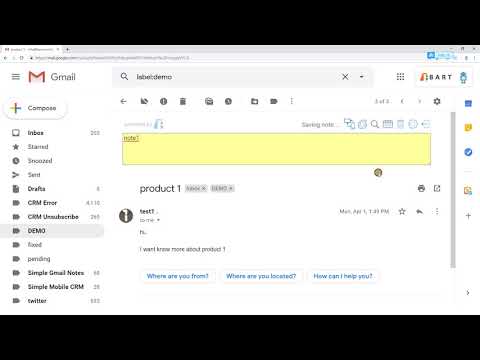
Gmailのメールスレッドにメモを追加する。

- メモを自分のGoogleドライブに保存 - 完全無料&オープンソース - Simple Mobile CRM(https://www.simplemobilecrm.com)でモバイル端末からメモにアクセス可能 - カレンダーにメモを追加 - メール概要ページにメモの要約を表示 - Chrome、Firefox、Edge、Safariに対応(メモ同期あり) - 同じブラウザで複数のGmailアカウントに対応 - メール印刷時にメモを表示 - メール本文を一切変更しません ** 使用方法 ** https://bart.solutions/how-to-use-simple-gmail-notes/ ** よくある質問 ** https://bart.solutions/simple-gmail-notes-faq/ ** 広告について ** 無料ユーザーは、メールページのサイドバーにときどき広告が表示されます。広告は5日間で合計3回のみ表示されます。常に当社内部製品の固定広告で、トラッキングは一切ありません。サブスクライバーは広告を非表示にできます。 ** 有料機能 ** - 1営業日以内のカスタマーサポート - ロゴの非表示 - メモが空のときにテキストエリアを自動的に隠す - 設定のインポートとエクスポート - 任意のGoogleドライブフォルダ名を設定 - 広告の削除 (https://bart.solutions/simple-gmail-notes-support-package/) ** モバイル端末(Android、iPhone、iPad)でメモを表示する方法 ** モバイル端末でメモを表示するには、Simple Mobile CRMをご利用ください。(https://www.simplemobilecrm.com/) ** Edgeブラウザについて ** 一部のEdgeユーザーからログイン時にクラッシュする報告があります。同様の問題が発生した場合は、代わりにEdgeアドオンストアから拡張機能をインストールしてください。

詳細

  • バージョン
    2.9.29.55
  • 更新:
    2026年9月1日
  • サイズ
    1.17MiB
  • 言語
    15 言語
  • デベロッパー
    BART SOLUTIONS LIMITED
    EASEY COMMERCIAL BUILDING 253-261 HENNESSY ROAD WANCHAI 001 Hong Kong
    ウェブサイト
    メール
    walty@bart.com.hk
  • 非取引業者
    このデベロッパーは取引業者として申告していません。EU 加盟国の消費者とこのデベロッパーとの間に締結された契約には、消費者の権利が適用されません。

プライバシー

拡張機能を管理し、組織での使用状況を確認できます
デベロッパーは、お客様のデータを収集または使用しないことを表明しています。 詳しくは、デベロッパーの privacy policy をご確認ください。

このデベロッパーは、お客様のデータについて以下を宣言しています

  • 承認されている以外の用途で第三者に販売しないこと
  • アイテムの中心機能と関係のない目的で使用または転送しないこと
  • 信用力を判断する目的または融資目的で使用または転送しないこと

サポート

質問や提案、問題がある場合は、デベロッパーのサポートサイトにアクセスしてください。

関連アイテム

Email Reply Status

4.4

Stop wasting time sorting through emails: Instantly know which of your emails needs a reply back.

Gmail Message Preview by cloudHQ

4.0

Preview emails in inbox.

Share and attach files in Gmail™ by cloudHQ

4.8

Attach and share files effortlessly from OneDrive, Dropbox, Box, Google Drive, Evernote and many more.

ActiveInbox: Organize Gmail™ tasks

4.6

Overwhelmed by too many to-dos in your inbox? Turn Gmail into an effortless task manager to never forget anything.

Notes for Gmail™ by cloudHQ

4.1

Add annotations on your emails to remember something, or to coach how to craft a good email.

RightTasks for Gmail™

4.5

Improved task management in Gmail™

Gmelius:Gmail向け共有受信トレイとAIアシスタント

4.6

毎日1時間を節約:AIアシスタントがメールを整理し、返信を作成。チームが会話を引き継ぎます。

Gmail Tabs by cloudHQ

4.0

GmailラベルまたはGmailフィルターをタブとして設定する

Sort Gmail Inbox by cloudHQ

4.1

Find an email in seconds with free preset filters

Gmail Sender Icons

4.4

Quickly identify the sender of email messages in Gmail without opening the message.

Gmail ノート - Gmailのメールにメモを追加

4.3

Gmailのメールにメモを追加して、何かを覚えておくため、シールのようなものです。

Rename Email Subject by cloudHQ

4.1

Rename email subjects for Gmail.

Email Reply Status

4.4

Stop wasting time sorting through emails: Instantly know which of your emails needs a reply back.

Gmail Message Preview by cloudHQ

4.0

Preview emails in inbox.

Share and attach files in Gmail™ by cloudHQ

4.8

Attach and share files effortlessly from OneDrive, Dropbox, Box, Google Drive, Evernote and many more.

ActiveInbox: Organize Gmail™ tasks

4.6

Overwhelmed by too many to-dos in your inbox? Turn Gmail into an effortless task manager to never forget anything.

Notes for Gmail™ by cloudHQ

4.1

Add annotations on your emails to remember something, or to coach how to craft a good email.

RightTasks for Gmail™

4.5

Improved task management in Gmail™

Gmelius:Gmail向け共有受信トレイとAIアシスタント

4.6

毎日1時間を節約:AIアシスタントがメールを整理し、返信を作成。チームが会話を引き継ぎます。

Gmail Tabs by cloudHQ

4.0

GmailラベルまたはGmailフィルターをタブとして設定する

Google アプリ
