


Overview
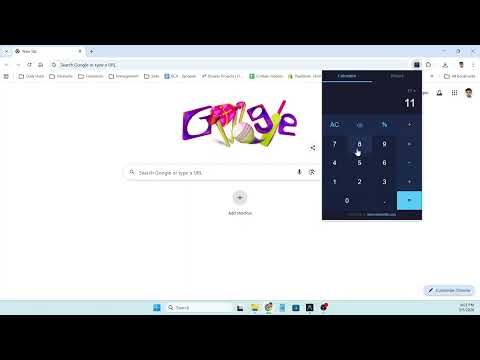
A clean, fast calculator in your browser toolbar. Supports basic arithmetic, percentages, keyboard input, and calculation history.
Simple Calculator is a fast, clean calculator that lives right in your Chrome toolbar. Click the icon and start calculating instantly — no need to open a new tab or switch to another app. 🔑 Key Features: → Basic arithmetic: add, subtract, multiply, divide → Percentage calculations → Backspace to correct mistakes → AC (All Clear) to start fresh → Decimal point support → Full keyboard support (0-9, +, -, *, /, Enter, Backspace, Escape) → Clean dark-themed interface → Calculation history — review and reuse past results → Click any history entry to load it back into the display → Works offline — no internet required 💡 How to Use: 1. Click the Simple Calculator icon in your toolbar 2. Click buttons or use your keyboard to enter calculations 3. Press = or Enter for the result 4. View past calculations in the History tab 5. Click any history entry to bring it back ⌨️ Keyboard Shortcuts: → 0-9: Enter numbers → +, -, *, /: Operators → Enter or =: Calculate → Backspace: Delete last digit → Escape: Clear all → %: Convert to percentage → .: Decimal point 🔒 Privacy First: → Only uses storage permission for history → No browsing data collected → No external connections → All calculations done locally
0 out of 5No ratings
Details
- Version1.0.0
- UpdatedMarch 5, 2026
- Size1.5MiB
- LanguagesEnglish
- DeveloperGagan SahayWebsite
84/1 Nai Basti Abdullapur Meerut Meerut, Uttar Pradesh 250001 INEmail
gagansahay695@gmail.comPhone
+91 97617 38451 - TraderThis developer has identified itself as a trader per the definition from the European Union and committed to only offer products or services that comply with EU laws.
Privacy

This developer declares that your data is
- Not being sold to third parties, outside of the approved use cases
- Not being used or transferred for purposes that are unrelated to the item's core functionality
- Not being used or transferred to determine creditworthiness or for lending purposes
Support
For help with questions, suggestions, or problems, please open this page on your desktop browser