

Simple Authenticator

Overview
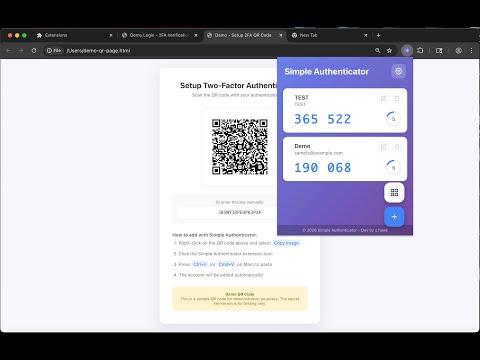
Generate TOTP 2FA codes for your accounts. Supports QR code scanning, manual entry, and auto-paste to login forms.
A simple and secure two-factor authentication (2FA/TOTP) app. Generate verification codes for your accounts easily. Works offline. DISCLAIMER (BETA VERSION): This extension is currently in beta. While we strive to provide a reliable service, we cannot guarantee its functionality or be held responsible for any issues, including but not limited to: loss of access to your accounts, data loss, or any other damages. Use at your own risk. Please always keep backup codes provided by your services. 🔐 FEATURES • Generate 6-digit or 8-digit TOTP codes • Support for standard TOTP (RFC 6238) • Easy account management (add, edit, delete) • QR code scanning via image paste (Ctrl+V / Cmd+V) • Auto-paste OTP codes to login forms • Works with single input fields and multi-box OTP inputs • Import/Export backup functionality • Multi-language support (EN, JA, ZH, KO, ES, DE, FR) • Clean, modern interface 🛡️ SECURITY & PRIVACY • All data stored locally - never uploaded anywhere • No internet connection required - works completely offline • No account registration needed • No tracking or analytics 📱 HOW TO USE 1. Click the extension icon to open 2. Add accounts by: - Pasting QR code image (Ctrl+V / Cmd+V) - Manually entering secret key - Importing from backup file 3. Click on the code to copy and auto-paste ✅ COMPATIBLE WITH Any service using standard TOTP authentication. Version: 1.0.0 (Beta) For Japanese ------------------------------ シンプルで安全な二要素認証(2FA/TOTP)アプリ。アカウントの認証コードを簡単に生成。オフラインで動作します。 免責事項(ベータ版): 本拡張機能は現在ベータ版です。信頼性の高いサービス提供に努めていますが、 機能の完全性を保証するものではなく、アカウントへのアクセス不能、データ損失、 その他いかなる損害についても責任を負いかねます。ご利用は自己責任でお願いいたします。 各サービスが提供するバックアップコードは必ず保管してください。 🔐 機能 • 6桁または8桁のTOTPコード生成 • 標準TOTP(RFC 6238)対応 • アカウントの追加・編集・削除 • QRコード画像のペースト読み取り(Ctrl+V / Cmd+V) • ログインフォームへの自動ペースト • 1つの入力欄と分割入力欄の両方に対応 • バックアップのインポート/エクスポート • 多言語対応(日本語、英語、中国語、韓国語、スペイン語、ドイツ語、フランス語) • シンプルでモダンなデザイン 🛡️ セキュリティとプライバシー • すべてのデータはローカルに保存 - 外部送信なし • インターネット接続不要 - 完全オフラインで動作 • アカウント登録不要 • トラッキング・分析なし 📱 使い方 1. 拡張機能アイコンをクリックして開く 2. アカウントを追加: - QRコード画像をペースト(Ctrl+V / Cmd+V) - シークレットキーを手動入力 - バックアップファイルからインポート 3. コードをクリックでコピー&自動ペースト ✅ 対応サービス 標準TOTP認証を使用するすべてのサービス バージョン: 1.0.0 (Beta)
0 out of 5No ratings
Details
- Version1.0.0
- UpdatedFebruary 1, 2026
- Offered byS.Hawk
- Size101KiB
- LanguagesEnglish (United States)
- Developer
Email
s.hawk.hemi.81@gmail.com - Non-traderThis developer has not identified itself as a trader. For consumers in the European Union, please note that consumer rights do not apply to contracts between you and this developer.
Privacy

This developer declares that your data is
- Not being sold to third parties, outside of the approved use cases
- Not being used or transferred for purposes that are unrelated to the item's core functionality
- Not being used or transferred to determine creditworthiness or for lending purposes