


Overview
AI assistant in your browser sidebar - chat, summarize pages, voice input, page automation, and multi-tab research
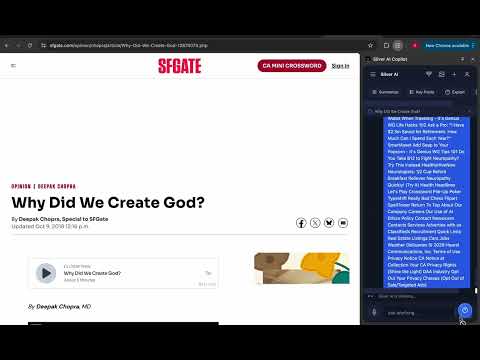
Silver AI Copilot is your intelligent browsing assistant that lives in Chrome's sidebar. Get instant AI-powered help without leaving the page you're on. FEATURES: • Smart Page Summarization — Instantly summarize any article, blog post, or documentation page. Get key points extracted in seconds. • Text Explanation & Translation — Select any text on a page and ask Silver AI to explain, translate, or simplify it. • Voice Input — Talk to Silver AI using your microphone. Perfect for hands-free browsing assistance. • Screenshot Analysis — Capture screenshots and let AI analyze what's on screen. Great for debugging, design feedback, or quick visual questions. • Context Menu Integration — Right-click on any text, image, or link to instantly send it to Silver AI for analysis. • Multi-Tab Research Mode — Gather content from all your open tabs and let Silver AI synthesize the information into a comprehensive summary. • Page Automation — Let Silver AI help you interact with web pages — click buttons, fill forms, scroll to elements, and more. • Proactive Suggestions — Silver AI detects what kind of page you're on (shopping, article, video, docs) and offers relevant quick actions. • Keyboard Shortcuts — Quickly access features with customizable shortcuts: - Ctrl+Shift+S (Cmd+Shift+S on Mac): Open Silver AI - Ctrl+Shift+X (Cmd+Shift+X on Mac): Capture screenshot - Ctrl+Shift+V (Cmd+Shift+V on Mac): Toggle voice input - Ctrl+Shift+R (Cmd+Shift+R on Mac): Research mode
0 out of 5No ratings
Details
- Version2.0.0
- UpdatedFebruary 18, 2026
- Size758KiB
- LanguagesEnglish
- DeveloperWebsite
Email
silverlinetechnology2@gmail.com - Non-traderThis developer has not identified itself as a trader. For consumers in the European Union, please note that consumer rights do not apply to contracts between you and this developer.
Privacy

Silver AI Copilot has disclosed the following information regarding the collection and usage of your data. More detailed information can be found in the developer's privacy policy.
Silver AI Copilot handles the following:
This developer declares that your data is
- Not being sold to third parties, outside of the approved use cases
- Not being used or transferred for purposes that are unrelated to the item's core functionality
- Not being used or transferred to determine creditworthiness or for lending purposes
Support
For help with questions, suggestions, or problems, visit the developer's support site