

Silent Media Grabber — download video, audio and images

Overview
Save the video, photo gallery or podcast from the page you're on — in one click. Videos as MP4, galleries as a folder.
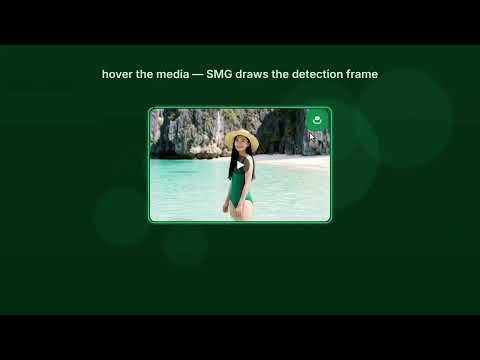
Save the video, photo gallery or podcast from the page you're on — in one click. Videos and live streams are saved as a regular MP4 file, a whole gallery as a folder with its name. Everything happens in your browser — no extra software, no account. How to use it: 1. Hover over a video or photo and click the green SMG button in its corner. 2. Download a whole gallery with the gallery button that appears on the page. 3. Everything the extension found on the page waits in the SMG popup — pick the quality and where to save there. • Video, audio and images, including HLS and DASH streams. • Quality picker; separate video and audio tracks merged into one MP4. • Whole galleries in one click — into a folder named after the gallery (ZIP in settings), also from all open tabs; a gallery the site hands out as a ZIP is unpacked for you; WEBP/AVIF saved as JPG or PNG on request. • Live streams recorded until you press "Finish & save"; when a stream can't be downloaded — record the tab, a region of it, or a window. • Downloads pause and resume, even after a browser restart. • A confirmation for every saved file, and on failure — the cause in plain words and what to do next. • Order out of the box: a library of folders by file kind (video, music, images, documents, archives, programs…) that you can rename and rearrange, names from the media title, your own save folder that files go straight into, without a “Save as” dialog. • You decide where it runs: per-site consent or everywhere, with an exclusion list and custom file formats (e.g. safetensors). • One-click settings backup — export and import. • File converter: lossless container change and audio to M4A for free; Pro adds service presets with a target size (e.g. WhatsApp ≤ 16 MB) — all locally. • Comics and manga: a gallery as one CBZ or PDF file, pages in reading order. • Podcasts: episodes from the page's RSS feed — pick and download in one go. • Many galleries and videos at once: select thumbnails, including from further search result pages; the Watcher can fetch new results (Pro). • Shops: selected products as “Name [SKU]” sets of full-size photos with a CSV summary of SKU and price (Pro). • A from–to part of a stream, subtitles next to the video, and MPEG-TS segments saved straight as MP4 — without re-encoding. • Built-in player and library for your downloads: list by time, alphabet or keywords, keyboard seeking. • Private mode with no download history, and an optional PIN lock for the history. • Hints on “Download” buttons: which one leads to the file and which to an ad or a program instead of the video — checked in your browser. We check the file before saving it: size, segments and container header — instead of a file that won't open. While seats in the First Hundred remain, everyone gets full Pro from the first minute. The first 100 people who click “Claim your spot” in the extension settings keep Pro forever — for free. What we don't do: YouTube, DRM, data collection, remote code.
0 out of 5No ratings
Details
- Version2.6.0
- UpdatedNovember 20, 2026
- FeaturesOffers in-app purchases
- Size7.04MiB
- Languages10 languages
- DeveloperSOFTCUBE Sp. z o.o.Website
Andersa 92 2 Wałbrzych 58-304 PLEmail
contact@softcube.cloudPhone
+48 882 184 267 - TraderThis developer has identified itself as a trader per the definition from the European Union and committed to only offer products or services that comply with EU laws.
- D-U-N-S850900513
Privacy

Silent Media Grabber — download video, audio and images has disclosed the following information regarding the collection and usage of your data. More detailed information can be found in the developer's privacy policy.
Silent Media Grabber — download video, audio and images handles the following:
This developer declares that your data is
- Not being sold to third parties, outside of the approved use cases
- Not being used or transferred for purposes that are unrelated to the item's core functionality
- Not being used or transferred to determine creditworthiness or for lending purposes
Support
For help with questions, suggestions, or problems, visit the developer's support site