

Silent Highlight

Overview
Private web highlighter and organizer. Export to Markdown/JSON and organize with categories, notes and tags.
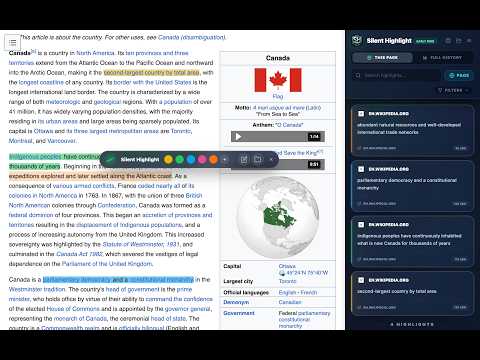
Private web and PDF highlighter. No account, no cloud. Colors, tags, Markdown notes, export to Markdown or sync to Obsidian. Tired of highlighting extensions that force you to create an account, track your reading habits, or hold your notes hostage in someone else's cloud? Meet Silent Highlight. Install it, select text on any web page or PDF, and start highlighting. There is no sign-up screen, no onboarding, and no server: your highlights are written to your browser's local storage and stay there. ✪ WHY SILENT HIGHLIGHT IS DIFFERENT ✔ 100% Private: Your highlights never leave your computer. No account, no cloud, no telemetry, no trackers. ✔ Nothing to Unlock: Unlimited highlights, unlimited categories, tags, Markdown notes and premium themes are all active from the first minute. No trial to start, no credit card, no upsell in your way. ✔ Undetectable by the Sites You Visit: The extension exposes no resources to the pages it runs on, so a website cannot fingerprint you by checking whether you have it installed. ✔ Ultra-Lightweight: Engineered for speed. Your browsing stays as fast as it was. ✪ CORE FEATURES ✔ Select and Highlight: A contextual floating toolbar appears exactly where your selection ends, with five colors for coding your research. ✔ Full PDF Support: Highlight text in local PDF documents through the built-in offline viewer, the same way you do on a web page. ✔ Smart Side Panel: Your command center (Alt+Shift+H, Option+Shift+H on macOS) to search, filter and manage every highlight across every site. ✔ Notes and Tags: Add Markdown notes of up to 5,000 characters with a live preview, plus custom tags with autocomplete. ✔ Flexible Organization: Group by color, category, page or date, and file your ideas into as many categories as you need. ✔ Story Mode: Reorder highlights by hand to build outlines, summaries and research threads independent of the pages they came from. ✔ Obsidian Sync: Write your highlights straight into a local vault folder as Markdown, with conflict detection that never overwrites an edit you made in Obsidian. ✔ Universal Export: Take everything with you as Markdown or as a JSON backup. Your data is never locked in. ✪ BUILT TO SURVIVE THE REAL WEB ✔ Restoration Report: When a page changes and a highlight can no longer be painted, Silent Highlight tells you why instead of silently dropping it, and lets you re-anchor it to the text by hand. ✔ Smart Recovery: Resilient anchors and fuzzy matching bring your highlights back even when the page structure has shifted underneath them. ✔ Data Integrity Protection: Built-in HMAC-SHA256 signatures verify your local database on every read and detect corruption or external tampering. ✔ Context Guardian: The extension reconnects to your open tabs after an update, so you keep working without reloading anything. ✔ Legacy Migration: Coming from TextMark? Your highlights and folders are migrated and cryptographically signed in the background, automatically. ✪ AVAILABLE IN THREE LANGUAGES ✔ English, Spanish and French, including the on-page toolbar and the exported notes. ✪ OUR PRIVACY PROMISE Silent Highlight is a pure tool for professionals, researchers and students who demand the highest standards in privacy and technical reliability. No accounts, no cloud, no friction — and nothing about your reading ever reaches us, because there is no "us" to reach.
0 out of 5No ratings
Details
- Version3.0.8
- UpdatedAugust 10, 2026
- Offered byprofang.ca
- Size862KiB
- Languages3 languages
- Developer
Email
profang.ca@gmail.com - Non-traderThis developer has not identified itself as a trader. For consumers in the European Union, please note that consumer rights do not apply to contracts between you and this developer.
Privacy

This developer declares that your data is
- Not being sold to third parties, outside of the approved use cases
- Not being used or transferred for purposes that are unrelated to the item's core functionality
- Not being used or transferred to determine creditworthiness or for lending purposes