


Overview
Firma digitalmente tus PDFs de forma rápida y segura con firma electrónica PKCS#12.
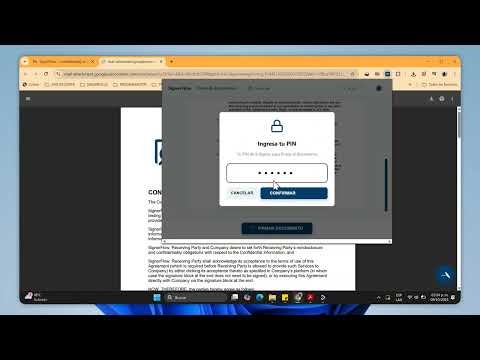
Firma PDFs sin salir del navegador. Disponible para Ecuador, otros paises. SignerFlow para Chrome te permite firmar documentos PDF directamente en la pestaña abierta: solo abre el PDF, haz un clic para ubicar la firma y confirma. Ideal para contratos, órdenes de compra, anexos y más. ¿Qué hace este elemento? Detecta PDFs en la pestaña actual y los muestra en un visor limpio y minimalista. Te deja elegir la posición de la firma con un clic (cuadro de 100×40 px en escritorio, 70×20 px en móvil). Envía el documento a SignerFlow con tu API Key para aplicar la firma y descarga el PDF firmado. Recupera tu perfil (correo/organización) desde la API para personalizar la experiencia. (Opcional) Soporta certificados PKCS#12 (.p12/.pfx): si los cargas, pedirá la contraseña al firmar. ¿Por qué instalarla? Ahorra tiempo: firma sin descargar, editar y volver a subir manualmente. Reduce errores: posición precisa con vista previa y coordenadas internas correctas. Mejor flujo: botón de Firmar centrado y paginador integrado; nada de menús confusos. Robusta con PDFs difíciles: maneja casos donde otros flujos fallan con “Append mode requires a document without errors…”. Enfoque en seguridad: la API Key se guarda en tu navegador; el certificado (si lo usas) permanece local. - Cómo funciona (3 pasos) 1.- Abre un PDF en Chrome (por ejemplo, un adjunto abierto en pestaña nueva desde 2 Outlook/SharePoint o un PDF público). 2.- Haz un clic en el punto donde quieres la firma. 3.- Pulsa Firmar y descarga el documento firmado. - Requisitos Cuenta en SignerFlow y API Key activa (créala en tu panel). El documento debe ser PDF. Si es Word/Excel/Imagen, expórtalo a PDF primero. - Privacidad y seguridad Sin contraseñas de cuenta: solo API Key para las llamadas a la API de SignerFlow. El certificado .p12/.pfx (si lo cargas) se almacena localmente en tu navegador y la contraseña se solicita al firmar. Conexión solo contra los endpoints oficiales de SignerFlow. - Casos de uso * Contratos de servicio y ventas. * Órdenes de compra, adendas y anexos. * Documentos legales con posicionamiento de firma fijo. -Soporte ¿Dudas o sugerencias? Describe el sitio donde abriste el PDF, si es público o autenticado (Outlook/SharePoint), y cualquier mensaje mostrado en la extensión para ayudarte más rápido. Cambios: 2025-09-18 - Lanzamiento inicial 2025-09-25 - Boton de llamada en pdf para firmar documentos. 2025-10-05 - PIN de seguridad
0 out of 5No ratings
Details
- Version3.9
- UpdatedOctober 21, 2025
- FeaturesOffers in-app purchases
- Size288KiB
- Languagesespañol
- DeveloperWebsite
Email
info@signerflow.com - Non-traderThis developer has not identified itself as a trader. For consumers in the European Union, please note that consumer rights do not apply to contracts between you and this developer.
Privacy

SignerFlow has disclosed the following information regarding the collection and usage of your data. More detailed information can be found in the developer's privacy policy.
SignerFlow handles the following:
This developer declares that your data is
- Not being sold to third parties, outside of the approved use cases
- Not being used or transferred for purposes that are unrelated to the item's core functionality
- Not being used or transferred to determine creditworthiness or for lending purposes
Support
For help with questions, suggestions, or problems, please open this page on your desktop browser