


Overview
Sign and fill PDFs locally - your files never leave the browser. Draw signatures, add text, download. Free first signature.
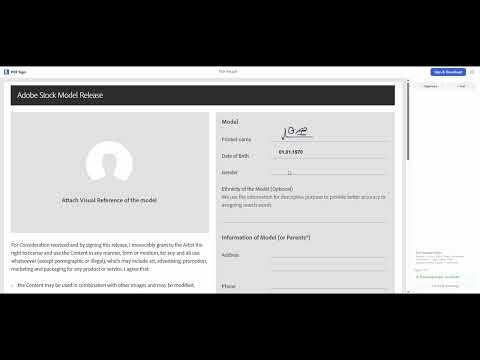
Sign PDFs in 30 seconds — your files never leave your browser. PDF Sign processes everything locally; we never see, store, or transmit your documents. We count signed-file totals per user to enforce the free tier, but never your file contents. First file free — try before you pay. $2.99/month for unlimited signing. ✦ WHO IT'S FOR • Freelancers sending contracts and invoices • Contractors signing NDAs • Realtors handling rental agreements • Small teams that need simple PDF signing without enterprise tooling • Anyone who needs to sign a PDF once a week without paying $15+/month ✦ SIGN • Draw your signature with a mouse, trackpad, or touchscreen • Save multiple signatures for quick reuse • Place anywhere on any page ✦ FILL • Add text fields on any page • 5 fonts: Helvetica, Times, Courier (Latin), Roboto and Open Sans (Latin / Cyrillic / Greek) • Full formatting: font size, color, bold, italic ✦ WORKS WITH ANY PDF • Multi-page documents up to 50 MB • Contracts, forms, invoices, agreements, tax filings • Password-protected PDFs are detected at upload — remove the password first, then try again • Download the signed PDF instantly ✦ HOW IT WORKS 1. Open any PDF 2. Draw or pick a saved signature 3. Place signatures and text on any page 4. Sign in with Google → download in seconds ✦ FREE vs PRO Free — sign 1 document to try it out Pro — unlimited signing, $2.99/month or $29.99/year (save 17% annually) ✦ FAQ Q: Are my files uploaded? A: Never. Everything runs in your browser. We don't see, store, or transmit your documents. Q: Does it work offline? A: Yes — the editor works fully offline. Internet is required only when you click Download (for sign-in and to update your free-tier counter). Q: What about Arabic, Chinese, Japanese, Hebrew, or Devanagari text? A: Latin, Cyrillic, and Greek scripts work out of the box. For other scripts, the editor shows a "script not supported" notice — we don't silently render unreadable text in your signed PDF. Q: Is the signature legally valid? A: For most US and EU use cases — yes, equivalent to a standard electronic signature under ESIGN Act / eIDAS simple electronic signature. Check your local rules for regulated contracts. Q: Do I need to create an account? A: Sign in with Google is required to download your signed file. No separate account or password needed.
5 out of 51 rating
Details
- Version1.1.2
- UpdatedApril 30, 2026
- FeaturesOffers in-app purchases
- Size2.41MiB
- LanguagesEnglish
- DeveloperWebsite
Email
pdfsign.support@gmail.com - Non-traderThis developer has not identified itself as a trader. For consumers in the European Union, please note that consumer rights do not apply to contracts between you and this developer.
Privacy

Sign PDF Privately - Local, No Upload has disclosed the following information regarding the collection and usage of your data. More detailed information can be found in the developer's privacy policy.
Sign PDF Privately - Local, No Upload handles the following:
This developer declares that your data is
- Not being sold to third parties, outside of the approved use cases
- Not being used or transferred for purposes that are unrelated to the item's core functionality
- Not being used or transferred to determine creditworthiness or for lending purposes