


Overview
Free up Google storage: find duplicates, big videos and junk, and back up originals. Not made by Google.
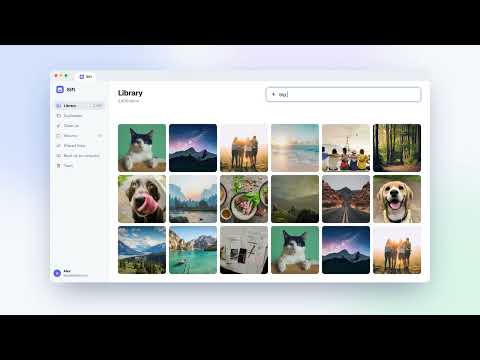
Your Google storage is full again? Sift finds what's filling your Google Photos and helps you clear it safely, in a few clicks, without paying Google for more storage. FREE UP SPACE • Duplicates and look-alikes: Sift groups copies and burst shots, keeps the sharpest, best-exposed one and marks the rest • Big and long videos, screenshots, low-resolution photos, and everything WhatsApp, Messenger and Signal saved, each with the exact space it frees • AI junk finder: spots memes, receipts, pocket shots and screenshots of text, and sorts them into piles to review • Ask in plain words: "big videos from last summer" turns into filters you can see and change WORK LIKE ON A DESKTOP • Three views: Photos (like Google Photos), Grid (like a folder on your computer) or Details (a list you can sort by size) • Click, Ctrl+click, Shift+click, drag a box, Ctrl+A, right-click • Merge albums, remove photos from albums, fix dates on many photos at once • Export your library as a spreadsheet (CSV) BACK UP AND STAY SAFE • Back up full-quality originals into ordinary folders on your computer, by month, year or album • Removed photos go to Google Photos' trash, where you can restore them for 30 days • Every clean-up shows how much it frees before you remove anything PRIVATE BY DESIGN • Sift runs in your browser and talks to Google Photos directly from your computer. Your photos, file names and library never reach our servers. • No separate login: Sift uses the Google Photos session already in Chrome and never sees your password. • The AI features use Gemini Nano, the AI built into Chrome, on your own computer. • No analytics, ads or tracking. FREE AND PRO Free: everything above, freeing up to 1 GB and backing up your first 500 photos. Sift Pro is a one-time purchase that removes the limits and adds album tools, multi-photo date changes and CSV export. Personal covers 1 Google account; Family covers up to 5. How to use Sift: https://www.siftphotos.pro/how-to-use/ Questions: https://www.siftphotos.pro/contact/ Sift is an independent app. It isn't made by, endorsed by or affiliated with Google. Google Photos is a trademark of Google LLC.
0 out of 5No ratings
Details
- Version0.1.1
- UpdatedOctober 30, 2026
- Size1.09MiB
- LanguagesEnglish
- DeveloperMichał WłosikWebsite
Północna 16/5 Wrocław 54-105 PLEmail
michal.wlosik@gmail.comPhone
+48 798 000 707 - TraderThis developer has identified itself as a trader per the definition from the European Union and committed to only offer products or services that comply with EU laws.
Privacy

Sift: Google Photos Cleaner & Duplicate Finder has disclosed the following information regarding the collection and usage of your data. More detailed information can be found in the developer's privacy policy.
Sift: Google Photos Cleaner & Duplicate Finder handles the following:
This developer declares that your data is
- Not being sold to third parties, outside of the approved use cases
- Not being used or transferred for purposes that are unrelated to the item's core functionality
- Not being used or transferred to determine creditworthiness or for lending purposes
Support
For help with questions, suggestions, or problems, visit the developer's support site