

Sidenote

Overview
Linked notepads in a side panel. Subpads, toggles, tables, ⌘K, and encrypted sync or sharing by key.
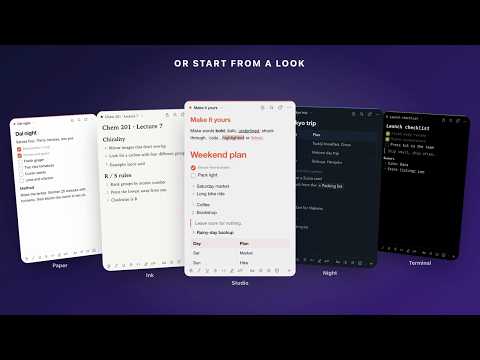
Sidenote keeps your notes beside the page you're reading. Click the toolbar icon and a notepad opens in Chrome's side panel on that tab only. Open it on other tabs too, with the same notepad or a different one, and every copy stays in sync. Want a notepad to come with you instead? Click the padlock and it stays open as you switch tabs; click it again to leave it where you are. NOTEPADS THAT LINK TO EACH OTHER Press ⌘K (Ctrl+K on Windows) to jump between notepads, create one by name, or link the selected text to another notepad or a website. Each notepad lists what links to it. STRUCTURE WITHOUT CLUTTER Headings, bullets, numbered lists, to-dos, toggles that fold content away, quotes, dividers and tables. Type / on an empty line to insert a block, or use markdown starters like "- ", "[] ", "# " and "> ". Bold, italic, underline, strikethrough, inline code and highlight use the usual shortcuts, and the formatting bar sits at the bottom of the panel. SUBPADS, STARS, ARCHIVE Put notepads inside notepads. Add a subpad from any notepad's ⋯ menu, move it with Move to…, or drag it onto another notepad in the full view's list. Star the ones you use most, archive the ones you're done with. Every heading can fold away the section under it. FULL VIEW The ↗ button opens Sidenote in a full tab: an overview of every notepad with its to-do progress, or a workspace with one to three notepads side by side. Drag the list to reorder or nest. SYNC AND SHARE, NO ACCOUNT Turn on sync and paste the sync key into Sidenote on your other computers. To share one notepad, pick Copy share key from its ⋯ menu and send the key; the other person pastes it into ⌘K. Edits from everyone merge paragraph by paragraph. Everything is encrypted in your browser before it's sent, so the sync service can't read it. Both are off until you turn them on. MAKE IT YOURS Five ready-made looks, or build your own: light and dark themes with twelve paper schemes (off-white, sepia, mist, stone, sage, graphite, black, slate, mocha, forest, plum), six fonts, text size, line height, six heading styles in three sizes, block spacing, square or round checkboxes. An accent colour per notepad, from the palette or any custom colour. Export and import your notes as JSON. LIGHT AND PRIVATE No accounts, no tracking, no ads. Notes stay in your browser unless you turn on sync or share a notepad, and then they travel encrypted. Plain JavaScript, no frameworks. Shortcuts to open the panel: Alt+Shift+N anywhere in Chrome (change it at chrome://extensions/shortcuts), and optionally a page-level combination of your choice, Right Shift+N by default, which needs a one-click permission.
0 out of 5No ratings
Details
- Version1.3.2
- UpdatedOctober 31, 2026
- Offered bySidenote
- Size74.77KiB
- LanguagesEnglish (United States)
- Developer
Email
micahctucker@gmail.com - Non-traderThis developer has not identified itself as a trader. For consumers in the European Union, please note that consumer rights do not apply to contracts between you and this developer.
Privacy

This developer declares that your data is
- Not being sold to third parties, outside of the approved use cases
- Not being used or transferred for purposes that are unrelated to the item's core functionality
- Not being used or transferred to determine creditworthiness or for lending purposes