

Sidebar Notepads PRO
3 ratings
)
Overview
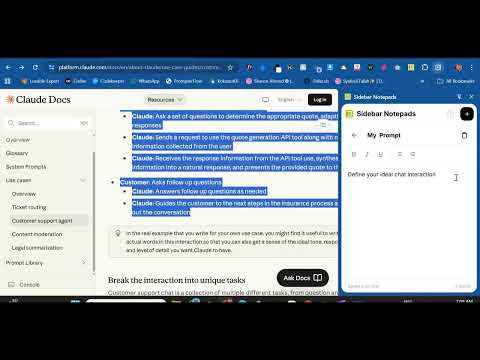
Side Panel Notepad lets you jot down notes as you browse. Opens in your sidebar to write and access while working on any page.
Sidebar Notepads is a Chrome extension that transforms your browser's side panel into a fully-featured note-taking workspace. Gives you quick access to your every day note needed for task right at your fingertips. KEY FEATURES • Unlimited Notes • Rich Text Editing • Auto-Save • Quickly find any note • Enjoy a sleek, modern interface • All notes are stored locally on browser PRIVACY & SECURITY Your privacy matters. All notes are stored locally on your device using Chrome's storage API. No data is ever sent to external servers, cloud services, or third-party platforms. Your notes remain completely private and under your control. PERFECT FOR • Quick thoughts while browsing • Research notes and bookmarks • Meeting notes and ideas • To-do lists and task tracking • Code snippets and technical notes • Any text you need to capture and use daily HOW IT WORKS Simply click the Sidebar Notepads icon in your Chrome toolbar to open the side panel. Create new notes with a single click, format them with the toolbar, and search through all your notes effortlessly. Everything is saved automatically, so you can focus on what matters. Transform your note taking experience with Sidebar Notepads
4.7 out of 53 ratings
Details
- Version1.0.1
- UpdatedFebruary 6, 2026
- Offered byIfeoluwa Ajetomobi
- Size1.33MiB
- LanguagesEnglish
- Developer
Email
ifeoluwa5223@gmail.com - Non-traderThis developer has not identified itself as a trader. For consumers in the European Union, please note that consumer rights do not apply to contracts between you and this developer.
Privacy

Sidebar Notepads PRO has disclosed the following information regarding the collection and usage of your data. More detailed information can be found in the developer's privacy policy.
Sidebar Notepads PRO handles the following:
This developer declares that your data is
- Not being sold to third parties, outside of the approved use cases
- Not being used or transferred for purposes that are unrelated to the item's core functionality
- Not being used or transferred to determine creditworthiness or for lending purposes
Support
For help with questions, suggestions, or problems, visit the developer's support site