

Side Copilot - AI Agent: Research, Organize & Automate | Claude Assistant

Overview
AI Agent takes action for you: manage tabs & windows, automate tasks, summarize & research. Arc-style vertical tabs sidebar.
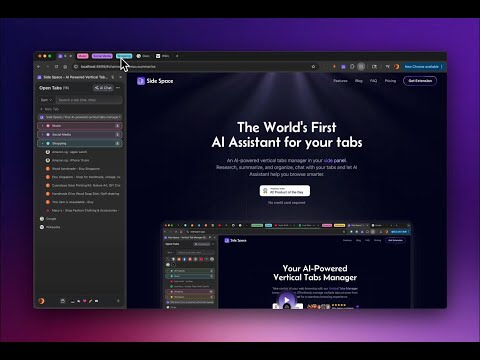
Side Copilot – Vertical Tabs, Spaces & AI Agent for Chrome Alternative to Arc Sidebar, Dia's Sidebar, Edge Vertical Tabs, Brave vertical tabs, Vivaldi Window Panel, and Zen Browser sidebar. Side Copilot is an Arc-style vertical tabs sidebar for Chrome with an AI agent that helps you organize tabs, manage windows, summarize content, and automate browsing workflows. If Chrome’s default tab bar feels messy, Side Copilot gives you a cleaner way to work. Move tabs into a sidebar, organize them into Spaces, sync them across browsers, and use AI to take action on your browsing context. 🌍 Browse less, more action Research, summarize, organize, and take action, browse less, more action. Side Copilot works inside your browser side panel to help you manage tabs and windows, group related pages, search browsing history, summarize open tabs, chat with files, and automate repetitive browser workflows. ⸻ 🤖 Why Side Copilot? Chrome still lacks a native vertical tabs experience that feels complete. Side Copilot fills that gap with a fast, focused sidebar designed for people who live with dozens of tabs open. Whether you are a student, marketer, developer, creator, designer, or researcher, Side Copilot helps you reduce tab clutter and stay in control of your workspace. ⸻ ✨ Key Features • 🧭 Vertical Tabs Sidebar for Chrome View and manage your tabs in a clean vertical layout that is easier to scan than the default horizontal tab bar. • 🗂️ Spaces for Tab Organization Create separate Spaces for work, study, research, shopping, reading, or side projects. Keep different contexts organized without losing your place. • 💾 Save, Restore, and Reorder Tabs Save sessions, restore tabs and tab groups, and reorder everything with drag and drop. • ☁️ Sync Across Browsers and Devices Sign in once to sync your Spaces across Chrome and compatible browsers, so your tabs stay available wherever you work. • 🔎 Fuzzy Search for Tabs and Spaces Find the tab, group, or Space you need in seconds, even when you have a large number of tabs open. • 🧹 Suspend Tabs to Save Memory Reduce browser memory usage by suspending inactive tabs when you need a lighter workspace. • 📚 Tab Group Management Manage tab groups more efficiently from the sidebar, including grouping, moving, restoring, and organizing related tabs. • 🔗 Group Guard and Auto Grouping Automatically group tabs based on URL rules, domain patterns, or custom categories. • 💬 AI Copilot Chat Mode Chat with your current page or open tabs. Ask Side Copilot to summarize, explain, compare, or organize what you are browsing. • 🤖 AI Copilot Agent Mode Go beyond chat. Ask AI to take action for you, such as managing tabs, grouping windows, searching browser history, and helping with browsing workflows. • 📄 Chat with Files Talk with PDFs, documents, images, and other files directly from your browser workflow. • 📺 Chat with YouTube Summarize videos, extract key points, and understand content faster without switching tools. • 🌙 Dark Mode Use Side Copilot comfortably day or night with dark mode support. • 📦 Backup Options Export your session data as JSON and keep a reliable backup of your Spaces. ⸻ 🗂️ Built for Heavy Tab Users Side Copilot is especially useful if you: - want vertical tabs in Chrome - miss Arc’s sidebar on Chrome - need a better tab manager for research and multitasking - want to organize tabs into Spaces - need browser sync across devices - want AI to help summarize, research, and automate browsing tasks ⸻ 💡 Why people choose Side Copilot over default Chrome tabs Default Chrome tabs get crowded fast. Titles shrink, groups become hard to scan, and switching context becomes frustrating. Side Copilot gives you: - better tab visibility - easier tab switching - cleaner session management - stronger focus with Spaces - faster research workflows with AI - a more modern sidebar browsing experience ⸻ 🪐 A smarter alternative to browser sidebars If you like the idea of Arc Browser’s sidebar, Edge vertical tabs, Brave vertical tabs, Vivaldi’s Window Panel, or Zen Browser’s sidebar, Side Copilot brings that experience to Chrome, with added AI tools for browsing, research, and organization. ⸻ 💅 Made for modern browsing Side Copilot combines: - vertical tabs manager - tab session organizer - Spaces workspace - browser sidebar - AI tab assistant - browsing research copilot - workflow automation tools So you can do more than store tabs. You can actually work with them. Try Side Copilot if you want a better Chrome sidebar for vertical tabs, smarter tab management, and an AI agent that helps you browse with less chaos and more control. Note: Side Copilot requires Chrome 114 or above.
4.1 out of 557 ratings
Details
- Version2.5.5
- UpdatedAugust 17, 2026
- Size7.87MiB
- Languages11 languages
- DeveloperWebsite
Email
support@sidecopilot.com - Non-traderThis developer has not identified itself as a trader. For consumers in the European Union, please note that consumer rights do not apply to contracts between you and this developer.
Privacy

Side Copilot - AI Agent: Research, Organize & Automate | Claude Assistant has disclosed the following information regarding the collection and usage of your data. More detailed information can be found in the developer's privacy policy.
Side Copilot - AI Agent: Research, Organize & Automate | Claude Assistant handles the following:
This developer declares that your data is
- Not being sold to third parties, outside of the approved use cases
- Not being used or transferred for purposes that are unrelated to the item's core functionality
- Not being used or transferred to determine creditworthiness or for lending purposes
Support
For help with questions, suggestions, or problems, visit the developer's support site