

Shutterfly Exporter
60 个评分
)
概述
Download all pictures from your Shutterfly album to your computer
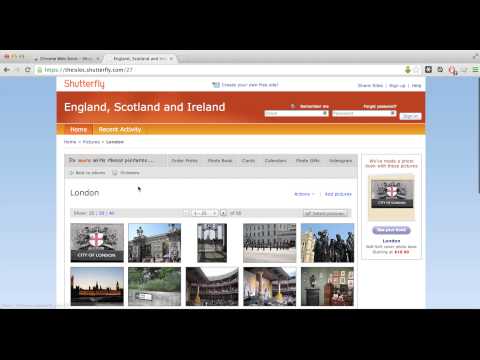
This simple extension allows you to download the contents of your Shutterfly album to your computer for backup. This extension works only on shared sites created with Shutterfly. It will not work from your account in Shutterfly. **** NOTE: If the extension doesn't work for you, send your comments to https://shutterflyextension.freshdesk.com/support/tickets/new **** Please note, Shutterfly Exporter Chrome Extension is not associated with Shutterfly. It is a free tool that is only made possible by community support, there is no corporation behind it. Hence, if you'd like to see changes to the tool, please support it via one of the following ways Square Cash https://cash.app/app/JNLQDBP PayPal https://www.paypal.com/donate/?token=barx6_FpUTzjrHQBKLT-AYCIWE-FBnwEVzeHjeKuZMzKtFcqaYqLumd2RnK7byyEuvAYFW&country.x=US&locale.x=US Bitcoin https://onename.com/katzmopolitan Coinbase https://www.coinbase.com/join/katzmopolitan Here is how it works - In your Shutterfly account, create a "share site" for the pictures that you want to download. This will create a site like "mypictures.shutterfly.com". You can create private site if you want to make sure no one has access to it. - Open the share site url in Chrome - Click on any subfolders with pictures that you have such that you see actually images appear - If the album is available for extraction, you will see an icon in right corder the URL bar - Click the arrow and press “Download my pictures” - If you get a notification about downloading files, click “Allow” - Your images should start downloading shortly. They will be downloaded into the default downloads folder. If you get a prompt about saving each individual file, please make sure that you've allowed the extension so save multiple files at a time (see screenshot) This extension is not affiliated with Shutterfly.com in anyway. I do not take an responsibility for your usage of the tool. This is an open source project. Source code can be accessed via https://bitbucket.org/katzmopolitan/shutterfly_export/overview License info: https://bitbucket.org/katzmopolitan/shutterfly_export/raw/master/LICENSE
3.9 星(5 星制)60 个评分
详情
- 版本2.0.1
- 上次更新日期2019年10月5日
- 提供方ilyakatz
- 大小545KiB
- 语言English
- 开发者
邮箱
ilyakatz@gmail.com - 非交易者该开发者尚未将自己标识为交易者。欧盟地区消费者须知:消费者权利可能不适用于您与该开发者达成的合约。
隐私权

支持
若有任何疑问、建议或问题,请在桌面浏览器中打开此页面