Item logo image for ShowMe: Business Central Field & Issue Report

ShowMe: Business Central Field & Issue Report

Item media 6 (screenshot) for ShowMe: Business Central Field & Issue Report
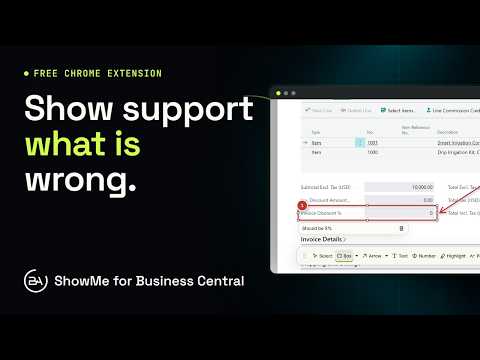
Item video thumbnail
Item media 2 (screenshot) for ShowMe: Business Central Field & Issue Report
Item media 3 (screenshot) for ShowMe: Business Central Field & Issue Report
Item media 4 (screenshot) for ShowMe: Business Central Field & Issue Report
Item media 5 (screenshot) for ShowMe: Business Central Field & Issue Report
Item media 6 (screenshot) for ShowMe: Business Central Field & Issue Report

Overview

See the Business Central page and field name you are on, mark up a screenshot, then send an issue report or file it to a tracker.

Report Microsoft Dynamics 365 Business Central issues with the context support needs. ShowMe shows the page and field name you are on, captures screenshots and your notes, lets you draw on them, and turns them into a report or a work item in your tracker. Free, from Bitta Apps, a Microsoft Dynamics 365 Business Central partner. FIELD NAMES WITHOUT GUESSWORK Click into a field and the ShowMe panel shows where you are, for example Customer Card > Payment Terms. Each note records the page, the field caption and its value, so support knows exactly which field you mean. Field names are the captions shown on the page; ShowMe does not show table or field IDs. CAPTURE AND DRAW • Capture the whole page, an area, or a menu after a 3 second delay • Draw numbered boxes, arrows, text and highlights, and blur anything private • Paste a Business Central error: ShowMe picks out the message and the Session and Activity IDs support asks for • Keep the last 10 to 60 seconds of the tab as video, with tab sound or your microphone • Record a tutorial: your clicks become a step by step guide with pictures SHARE OR FILE • Export a PDF, HTML, Markdown or ZIP file, copy the report into an email, or download an email draft • File notes to Azure DevOps, Jira or monday.com, and see exactly what will be sent first WHO IT IS FOR Business Central users reporting an issue, key users running user acceptance testing, consultants documenting a go-live, and support teams who want every ticket to arrive with the page, the field and the error. PRIVATE BY DESIGN Reports stay on your computer until you export, copy, email or file them. No account, no analytics, no tracking. Site access is optional and requested only when you need it. Works in Chrome and Microsoft Edge with Business Central online, and on other sites you choose to allow. ABOUT BITTA APPS Bitta Apps implements Business Central, supports it after go-live, and publishes Business Central apps on Microsoft Marketplace. https://bittaapps.com ShowMe is an independent extension and is not made by or affiliated with Microsoft. Dynamics 365 and Business Central are trademarks of Microsoft.

Details

  • Version
    0.1.1
  • Updated
    November 5, 2026
  • Offered by
    Bitta Apps
  • Size
    3.46MiB
  • Languages
    English
  • Developer
    Bitta Apps LLC
    3390 Big Dipper Dr Corona, CA 92882-8335 US
    Email
    info@bittaapps.com
    Phone
    +1 626-766-9732
  • Trader
    This developer has identified itself as a trader per the definition from the European Union and committed to only offer products or services that comply with EU laws.
  • D-U-N-S
    056907221

Privacy

Manage extensions and learn how they're being used in your organization

ShowMe: Business Central Field & Issue Report has disclosed the following information regarding the collection and usage of your data. More detailed information can be found in the developer's privacy policy.

ShowMe: Business Central Field & Issue Report handles the following:

Personally identifiable information
Authentication information
Web history
User activity
Website content

This developer declares that your data is

  • Not being sold to third parties, outside of the approved use cases
  • Not being used or transferred for purposes that are unrelated to the item's core functionality
  • Not being used or transferred to determine creditworthiness or for lending purposes

Support

For help with questions, suggestions, or problems, visit the developer's support site

Related

Business Growth Finder

0.0

Audit the page you're on for SEO and conversion opportunities and turn the findings into reports. Runs locally.

ScreenshotPro - Full Page Capture & Annotate

0.0

Capture full page or visible area screenshots. Annotate with arrows, text and highlights. Download as PNG or PDF.

Sayso - Voice website reviews

5.0

Talk through any website. Every sentence becomes a screenshot pinned to the exact element - then export a client-ready report.

Usero: Report bugs on any website

0.0

Capture bugs on any site with screenshot, console, and DOM attached. Usero turns the report into a ready-to-review pull request.

ProURLMonitor Auditor

5.0

Capture full-page screenshots, audit SEO, and save reports to ProURLMonitor.

Screenshot & Screen Recorder - Shot by Laze

5.0

Screenshot tool & screen recorder for Chrome. Full page, scrolling, visible area or desktop capture. Annotate & share with your team

Meeting Memo Overlay

0.0

Pin numbered notes with screenshots on any element of a web page, then export them as text, JSON or a PowerPoint report.

Tasks, Screenshots & Time Tracking: ClickUp

0.0

Turn any page or email into a ClickUp task. Screenshots, quick capture, links & files, and built-in time tracking.

Page2Task

5.0

Turn any page, email, or screenshot into a Google Task or Calendar event, with deadlines and locations detected for you.

Session Replay - Screenshot & Screen Recorder for Bug Reports

5.0

Report a bug in one click: capture a screenshot or screen recording, console errors and browser details, as one bug report link.

Capto — Relatório de bug automático

5.0

Reportar problema, fácil pra qualquer um. Captura cliques, network, console e screenshots — vira ticket completo automaticamente.

Redpen: Report bugs with screenshot/recording

5.0

Capture screenshot and record screen to report bugs and visual feedback.

Business Growth Finder

0.0

Audit the page you're on for SEO and conversion opportunities and turn the findings into reports. Runs locally.

ScreenshotPro - Full Page Capture & Annotate

0.0

Capture full page or visible area screenshots. Annotate with arrows, text and highlights. Download as PNG or PDF.

Sayso - Voice website reviews

5.0

Talk through any website. Every sentence becomes a screenshot pinned to the exact element - then export a client-ready report.

Usero: Report bugs on any website

0.0

Capture bugs on any site with screenshot, console, and DOM attached. Usero turns the report into a ready-to-review pull request.

ProURLMonitor Auditor

5.0

Capture full-page screenshots, audit SEO, and save reports to ProURLMonitor.

Screenshot & Screen Recorder - Shot by Laze

5.0

Screenshot tool & screen recorder for Chrome. Full page, scrolling, visible area or desktop capture. Annotate & share with your team

Meeting Memo Overlay

0.0

Pin numbered notes with screenshots on any element of a web page, then export them as text, JSON or a PowerPoint report.

Tasks, Screenshots & Time Tracking: ClickUp

0.0

Turn any page or email into a ClickUp task. Screenshots, quick capture, links & files, and built-in time tracking.

Search
Clear search
Close search
Google apps
Main menu
