

ShotForge — Full Page Screenshot
1 rating
)
Overview
Capture entire scrolling pages, a visible area or a selected region. Crop, annotate and export to PNG, JPG, WEBP or PDF.
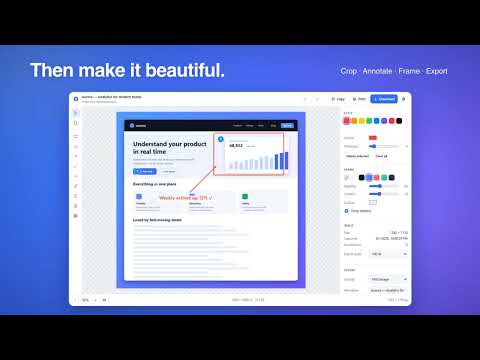
ShotForge captures any web page — the entire scrolling page, just the visible area, a rectangle you drag, or a single element you click — then opens a full editor to crop, annotate and export. CAPTURE • Entire page: scrolls and stitches the whole document, hiding sticky headers so they don't repeat. Follows inner scroll panels on web apps. • Visible area, selected region, or a single element (hover & click). • Optional 3/5/10-second countdown for menus and hover states. EDIT • Crop with handles and rule-of-thirds guides. • Annotate: rectangles, ellipses, arrows, lines, freehand pen, highlighter, text, numbered steps, and a pixelate tool to redact sensitive content. • Beautify: padding, solid or gradient backgrounds, rounded corners, shadow. • Full undo/redo. Annotations are saved with each capture. EXPORT • PNG, JPG or WEBP at 25–200 % scale. • PDF with paper sizes (Letter, Legal, A3/A4/A5…), smart page splitting that avoids cutting text lines, optional URL + date footer, lossless mode. • Copy to clipboard (auto-fitted to the Google Docs paste limit), or print. HISTORY • A local gallery of your recent captures: reopen, re-export, delete, or combine several captures into one PDF. PRIVATE BY DESIGN Everything runs locally in your browser. No account, no server, no analytics — screenshots never leave your machine.
5 out of 51 rating
Details
- Version1.0.0
- UpdatedSeptember 5, 2026
- Size67.72KiB
- LanguagesEnglish
- Developer
Email
dubois.b91@gmail.com - Non-traderThis developer has not identified itself as a trader. For consumers in the European Union, please note that consumer rights do not apply to contracts between you and this developer.
Privacy

This developer declares that your data is
- Not being sold to third parties, outside of the approved use cases
- Not being used or transferred for purposes that are unrelated to the item's core functionality
- Not being used or transferred to determine creditworthiness or for lending purposes