

搜索框聚焦快捷键

概述
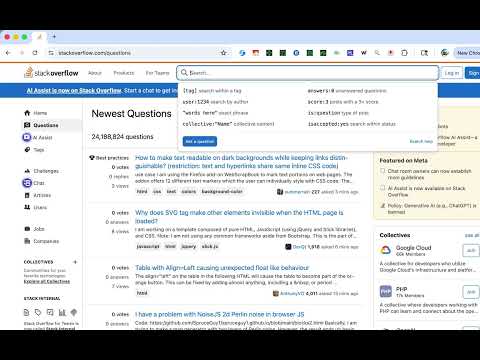
使用 Shift+Space 聚焦到搜索框。添加网站后,可在这些网站上使用快捷键。
Shortcut For Focusing On Search Field Quickly focus on search fields with a simple keyboard shortcut: Shift + Space. 🔍 How it works: - Press Shift + Space on any supported site to instantly focus the search field - Press Shift + Space again to blur (unfocus) the field - Works with modern web apps including Shadow DOM and dynamic content 📋 Ready to use: - Works on 11 popular websites out of the box (search engines, video platforms, shopping sites, social media, and more) - Click the extension icon to see all supported sites - Google is always enabled as the protected default ➕ Add your own sites: 1. Click the extension icon 2. Paste an HTTPS URL (e.g. https://www.example.com/) 3. Grant permission when prompted 4. The site is now enabled for Shift + Space 🔒 Privacy first: - No data collection or tracking - Settings sync via Chrome's built-in sync (stays on your devices) - No external servers contacted 💡 Tips: - Pin the extension icon for quick access to site management - Custom sites can be removed anytime (Google cannot be removed) - Your site list syncs across all your Chrome browsers Open source: https://github.com/gakkunn/Ex-Chrome-forcus_field
0 星(5 星制)无评分
详情
- 版本1.1.0
- 上次更新日期2025年12月20日
- 提供方yoshi
- 大小698KiB
- 语言10 种语言
- 开发者
邮箱
yoshi.apps.contact@gmail.com - 非交易者该开发者尚未将自己标识为交易者。欧盟地区消费者须知:消费者权利可能不适用于您与该开发者达成的合约。
隐私权

该开发者已声明,您的数据:
- 不会因未获批准的用途出售给第三方
- 不会为实现与产品核心功能无关的目的而使用或转移
- 不会为确定信用度或放贷目的而使用或转移