

Shortcut For Focusing On Search Field

Overview
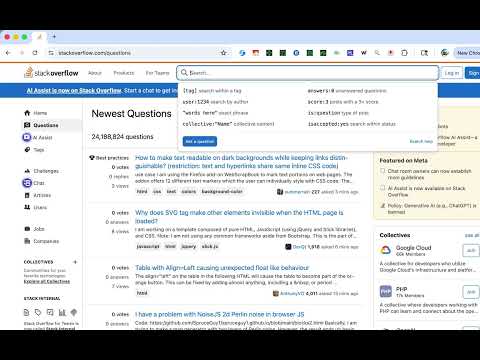
Focus on search fields with Shift + Space. Add your own sites to the list to focus on search fields on those sites.
Shortcut For Focusing On Search Field Quickly focus on search fields with a simple keyboard shortcut: Shift + Space. 🔍 How it works: - Press Shift + Space on any supported site to instantly focus the search field - Press Shift + Space again to blur (unfocus) the field - Works with modern web apps including Shadow DOM and dynamic content 📋 Ready to use: - Works on 11 popular websites out of the box (search engines, video platforms, shopping sites, social media, and more) - Click the extension icon to see all supported sites - Google is always enabled as the protected default ➕ Add your own sites: 1. Click the extension icon 2. Paste an HTTPS URL (e.g. https://www.example.com/) 3. Grant permission when prompted 4. The site is now enabled for Shift + Space 🔒 Privacy first: - No data collection or tracking - Settings sync via Chrome's built-in sync (stays on your devices) - No external servers contacted 💡 Tips: - Pin the extension icon for quick access to site management - Custom sites can be removed anytime (Google cannot be removed) - Your site list syncs across all your Chrome browsers Open source: https://github.com/gakkunn/Ex-Chrome-forcus_field
0 out of 5No ratings
Details
- Version1.1.0
- UpdatedDecember 20, 2025
- Offered byyoshi
- Size698KiB
- Languages10 languages
- Developer
Email
yoshi.apps.contact@gmail.com - Non-traderThis developer has not identified itself as a trader. For consumers in the European Union, please note that consumer rights do not apply to contracts between you and this developer.
Privacy

This developer declares that your data is
- Not being sold to third parties, outside of the approved use cases
- Not being used or transferred for purposes that are unrelated to the item's core functionality
- Not being used or transferred to determine creditworthiness or for lending purposes