

ShiftSync — WFM Schedule to Calendar
Overview
Automatically sync your NICE WFM (WebStation) shifts to Google Calendar — a clean ICS import, no manual event entry.
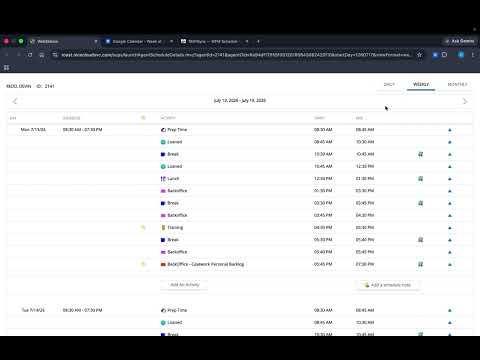
ShiftSync keeps your work schedule and your Google Calendar in sync — automatically. If you work a shift-based schedule in NICE WFM (WebStation), you know the pain of copying each shift, break, and meeting into your personal calendar by hand. ShiftSync does it for you. Open your weekly schedule, and your shifts flow straight into Google Calendar — cleanly, with the right times, and without creating duplicates. ShiftSync reads the schedule already displayed on your WebStation page, builds a standard calendar file (ICS), and imports it into a dedicated Google Calendar. Because it uses Google's own import mechanism rather than adding events one at a time, syncing is fast, reliable, and repeatable — re-syncing updates your existing entries instead of piling on copies. Key features Automatic sync on page load — Confirm once, and every time you open your weekly schedule afterward, ShiftSync updates your calendar with zero clicks. One-click manual sync — Prefer to stay in control? Hit "Sync This Agent" whenever you want. Download-only option — Just want the file? Export your schedule as an ICS you can import anywhere. Smart calendar targeting — Automatically detects your name and syncs to a "Nice Schedule – [Your Name]" calendar, keeping work shifts separate from your personal events. You can override the calendar name at any time. Timezone-aware — Detects your computer's timezone automatically, with a built-in ±1-hour adjustment if your shift times ever look off. Jumps straight to your schedule — Landing on the WebStation home page forwards you to your current week's schedule view, so it's ready to sync. Clean re-syncs — Updating a week won't clutter your calendar with duplicate shifts. How it works Open your weekly schedule in NICE WebStation. ShiftSync reads the shifts shown on the page. It generates a standard ICS calendar file locally, in your browser. It imports that file into your chosen Google Calendar. That's it — your shifts, breaks, meetings, and other activities appear on your calendar with correct dates and times. Setup takes under a minute Install ShiftSync and open your NICE WebStation weekly schedule. Click the ShiftSync icon and choose "Sync This Agent" (or turn on "Auto-sync on page load"). Confirm the first import — after that, it runs automatically. Your data stays yours ShiftSync processes everything locally in your browser. It does not send your schedule to any third-party server, and it does not collect, store, or share your personal data. The only external service involved is your own Google Calendar, which the extension writes to on your behalf using Google's standard import screen. Permissions — and why they're needed Access to your NICE WebStation pages — to read the schedule you're viewing. Access to Google Calendar — to import your shifts into your calendar. Tabs & scripting — to open the Google Calendar import screen and complete the import for you. Storage — to remember your preferences (auto-sync, calendar name). Notifications — to tell you when a sync succeeds or needs attention. Who it's for Contact-center agents, support reps, and anyone on a NICE WFM shift schedule who wants their work hours in Google Calendar without the manual copy-and-paste. ShiftSync is an independent tool and is not affiliated with, endorsed by, or sponsored by NICE Ltd. or Google LLC. "NICE," "WebStation," and "Google Calendar" are trademarks of their respective owners.
0 out of 5No ratings
Details
- Version1.0
- UpdatedJuly 18, 2026
- Size33.18KiB
- LanguagesEnglish (United States)
- Developer
Email
devinredd1@gmail.com - Non-traderThis developer has not identified itself as a trader. For consumers in the European Union, please note that consumer rights do not apply to contracts between you and this developer.
Privacy

ShiftSync — WFM Schedule to Calendar has disclosed the following information regarding the collection and usage of your data. More detailed information can be found in the developer's privacy policy.
ShiftSync — WFM Schedule to Calendar handles the following:
This developer declares that your data is
- Not being sold to third parties, outside of the approved use cases
- Not being used or transferred for purposes that are unrelated to the item's core functionality
- Not being used or transferred to determine creditworthiness or for lending purposes