

SHEIN Search by Image
Overview
Find SHEIN products by image, capture a region, and save your favorites. Independent extension.
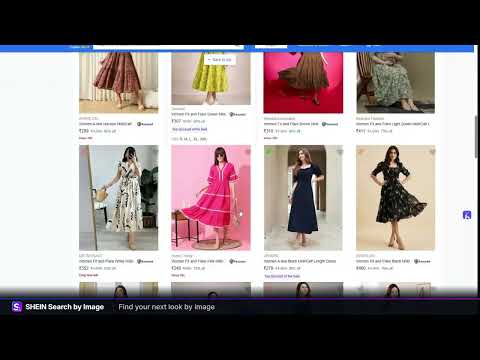
SHEIN Search by Image helps you find similar SHEIN clothing, bags and accessories from a photo. Start with an outfit you like, a product image or a detail on a webpage, then explore visually related products without having to describe every color, fabric or shape in a text search. SEARCH SHEIN USING AN IMAGE Choose the image search method that fits what you are browsing: - Upload a JPEG, PNG or WebP image up to 5 MB. - Paste a public HTTPS image URL. - Capture a selected region of the current webpage. - Start an image search from the browser's image context menu. Use the capture icon in the popup to select an item on screen. The default Alt+Shift+S shortcut also starts region selection. Release your selection to begin searching automatically, or press Escape to cancel. Capture is available on supported webpages; Chrome internal pages and other restricted pages cannot be captured. FOLLOW YOUR SEARCH AS IT HAPPENS The extension shows the relevant stages of preparing your image, uploading it when needed, searching and preparing results. You can see elapsed time, cancel an active search or try again. No manual API key or service connection setup is required. For a more focused reverse image search, crop around one garment, bag or accessory and choose an image where the item is easy to see. Results can include similar alternatives; an exact match is not guaranteed. EXPLORE, SAVE AND COMPARE - Search within the returned product titles. - Filter available prices by currency and price range. - Sort available prices within each currency; currencies are not converted. - Compare up to four products side by side. - Save up to 200 favorites on your device. - Choose regular or compact product cards. - Use light, dark or device-based appearance settings. Prices appear when provided. A missing price is left blank. Availability, prices and product details can change, so verify the current information on the destination website before purchasing. MAKE IMAGE SEARCH PART OF YOUR BROWSING SHEIN Search by Image supports English, Spanish, French, Arabic and Portuguese, including a right-to-left Arabic interface. Choose balanced image quality for smaller uploads or keep the original quality. Adjust recent-search retention to one, three or seven days. To get started, open the extension, upload an image, paste its URL or capture a region. Search begins after your selection. Browse the results, save interesting items and use the product button when you want to continue. PRIVACY AND TRANSPARENCY A real search sends your selected image or image URL to the search service and its external search providers. For screen capture, only the selected crop is saved and sent for searching. The extension does not continuously monitor your browsing. Recent searches, including selected image data, are stored locally, with a limit of eight recent searches. Uploaded images have temporary links that expire after 15 minutes. Anyone with a valid link can access the image before expiry; expired uploads are removed during cleanup. External providers may apply different retention rules. You can clear recent searches in Settings. SHEIN Search by Image is an independent extension published by toolai. It is not affiliated with, endorsed by or produced by SHEIN. Affiliate disclosure: product buttons use affiliate links. When you choose to open a product, the extension opens an affiliate redirect, and toolai may earn a commission if a qualifying purchase is made. The extension does not promise a discount or cashback. Support: adilmahfoudi@gmail.com
0 out of 5No ratings
Details
- Version1.2.1
- UpdatedNovember 11, 2026
- Offered bytoolai
- Size4.65MiB
- Languages6 languages
- Developer
Email
adilmahfoudi@gmail.com - Non-traderThis developer has not identified itself as a trader. For consumers in the European Union, please note that consumer rights do not apply to contracts between you and this developer.
Privacy

This developer declares that your data is
- Not being sold to third parties, outside of the approved use cases
- Not being used or transferred for purposes that are unrelated to the item's core functionality
- Not being used or transferred to determine creditworthiness or for lending purposes
Support
For help with questions, suggestions, or problems, please open this page on your desktop browser