

SHEIN Coupon Finder

Overview
Automatically finds and applies the best SHEIN coupon codes for your region.
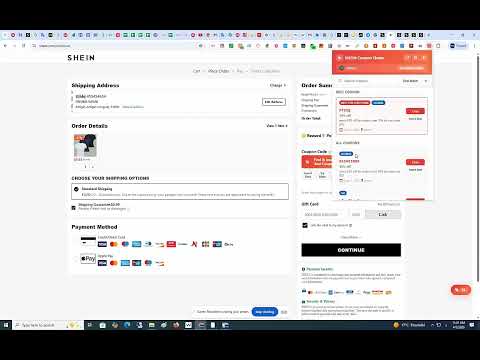
🛍️ SHEIN Coupon Finder — Your Smart Coupon Assistant for SHEIN Shopping Stop wasting time searching for SHEIN promo codes! SHEIN Coupon Finder automatically detects your region, finds the best available coupon codes, and helps you apply them at checkout — all in one click. ━━━━━━━━━━━━━━━━━━━━━━━━━━━━━━━━━━━━━━ 🎯 KEY FEATURES: ✅ Automatic Region Detection The extension detects which SHEIN store you're browsing (fr.shein.com, ar.shein.com, us.shein.com, de.shein.com, and 50+ more regional domains) and automatically prioritizes coupons that work in your country. ✅ Smart Coupon Ranking Not all coupons are equal. Our intelligent ranking system scores each coupon based on: - Region match (country-specific coupons rank higher) - Discount value (bigger savings first) - Expiration date (active coupons prioritized) - Coupon completeness and reliability ✅ One-Click Coupon Insertion On the SHEIN checkout page, a "Find & Insert Best Coupon" button appears right next to the promo code field. One click and the best coupon is automatically filled in for you — no copy-pasting needed! ✅ Try Multiple Coupons Didn't work? Click "Try Next" to cycle through all available coupons until you find the one that gives you the biggest discount. ✅ Beautiful Popup Interface Click the extension icon anytime to browse all available coupons. Features include: - Search coupons by code, title, or description - Sort by Best Match, Newest, or Expiring Soon - Copy any coupon code with one click - Insert directly into the checkout page - See discount percentages and expiration dates at a glance ✅ Floating Widget on SHEIN Pages A discreet floating badge appears on every SHEIN page showing the number of available coupons. Click to expand a full coupon panel without leaving the page. ✅ Auto-Apply Feature Enable auto-apply in settings and the extension will automatically click the "Apply" button after inserting a coupon code, saving you even more time. ✅ Dark Mode Support Comfortable browsing in any lighting. The extension supports Light, Dark, and System themes that match your browser preference. ✅ Multi-Language Support Available in English, French, and Arabic with full RTL (Right-to-Left) layout support for Arabic users. ━━━━━━━━━━━━━━━━━━━━━━━━━━━━━━━━━━━━━━ 🌍 SUPPORTED REGIONS (50+ Countries): 🇺🇸 United States | 🇬🇧 United Kingdom | 🇫🇷 France | 🇩🇪 Germany | 🇪🇸 Spain | 🇮🇹 Italy | 🇸🇦 Saudi Arabia | 🇦🇪 UAE | 🇲🇦 Morocco | 🇪🇬 Egypt | 🇹🇷 Turkey | 🇧🇷 Brazil | 🇲🇽 Mexico | 🇨🇦 Canada | 🇦🇺 Australia | 🇯🇵 Japan | 🇰🇷 South Korea | 🇮🇳 India | 🇵🇱 Poland | 🇳🇱 Netherlands | 🇧🇪 Belgium | 🇵🇹 Portugal | 🇸🇪 Sweden | 🇩🇰 Denmark | 🇳🇴 Norway | 🇫🇮 Finland | 🇨🇭 Switzerland | 🇦🇹 Austria | 🇮 This extension uses affiliate links. We may earn a commission when you use coupons or links, at no extra cost to you.
0 out of 5No ratings
Details
- Version1.0.2
- UpdatedApril 24, 2026
- Offered byكوبوناتي
- Size76.2KiB
- Languagesالعربية
- Developer
Email
adil.m.2019.m@gmail.com - Non-traderThis developer has not identified itself as a trader. For consumers in the European Union, please note that consumer rights do not apply to contracts between you and this developer.
Privacy

This developer declares that your data is
- Not being sold to third parties, outside of the approved use cases
- Not being used or transferred for purposes that are unrelated to the item's core functionality
- Not being used or transferred to determine creditworthiness or for lending purposes
Support
For help with questions, suggestions, or problems, visit the developer's support site