

Sheets Genie

Tổng quan
Turn Google Sheets into a business automation & web scraping powerhouse.
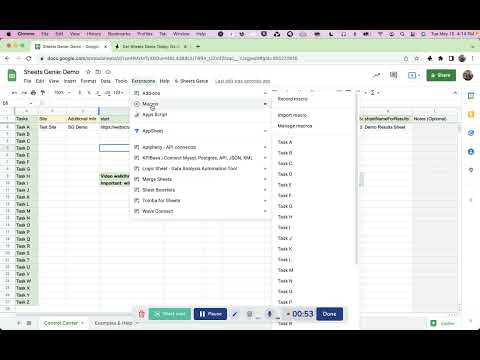
The Sheets Genie Chrome Extension let you turn Google Sheets into a web scraping and business automation powerhouse, doing things with Google Sheets you never dreamed possible. For it to work, you must have first installed the SG Add On: https://workspace.google.com/marketplace/app/sheets_genie/567176214397 For step by step guidance on data extraction with SG, and to see what you can do, you can check out the following training on Udemy, which is taught by SG's developer, Dave Fonvielle: https://www.udemy.com/course/web-scraping-scrape-data-to-google-sheets-with-sheets-genie/ If you don't want to enroll in the course, that's fine. You can see all the necessary videos for free as part of the "free preview" without signing in or anything. Here the big picture with SG, since it's more than "just" web scraping... Sheets Genie automates business tasks with one click so that you: -- scale up your business activities and productivity -- save time and effort Among other things, it helps you: -- get data into your spreadsheets quickly and easily and then process it in useful ways -- automate and scale your use of other online tools -- automate tasks behind logins (since you can be already logged into your accounts in your browser when you run it) As far as extracting data from websites goes, Sheets Genie has been called a "Google Sheets Web Scraper" because it helps you with website scraping and data extraction in the following ways: -- No messy CSVs or other export / import situations, where you first have to export your scraped data, then import it into another spreadsheet tool, because… -- It not only scrapes your information for you, but it scrapes it directly to your target spreadsheet -- You have absolute control over where your data is placed in your spreadsheet, including even the exact sheet and column, and sometimes, even row -- If you have a column of urls, you can automatically scrape all those links, and then have the scrape results automatically placed in your spreadsheet -- If appropriate, this includes the option to place the results exactly in the row where the link was found, kind of like enriching that row with additional information -- you can also automatically exclude any results that contain certain values that you don't want in your sheet for whatever reason Learn more about Sheets Genie on OnlineSuccessGenie.com, at: https://onlinesuccessgenie.com/sheets-genie/
5/58 lượt xếp hạng
Chi tiết
- Phiên bản0.0.0.7
- Đã cập nhật23 tháng 11, 2022
- Kích thước77.44KiB
- Ngôn ngữEnglish
- Nhà phát triểnTrang web
Email
onlinesuccessgenie@gmail.com - Người bán phi thương mạiNhà phát triển này không tự nhận mình là người bán. Đối với người tiêu dùng ở Liên minh Châu Âu, xin lưu ý rằng các quyền của người tiêu dùng không được áp dụng trong hợp đồng giữa bạn và nhà phát triển này.
Quyền riêng tư

Nhà phát triển này tuyên bố rằng dữ liệu của bạn
- Không được bán cho bên thứ ba, ngoài những trường hợp sử dụng đã được phê duyệt
- Không được sử dụng hoặc chuyển nhượng cho các mục đích không liên quan đến chức năng chính của mặt hàng
- Không được sử dụng hoặc chuyển nhượng để xác định khả năng thanh toán nợ hoặc phục vụ mục đích cho vay
Hỗ trợ
Nếu bạn có câu hỏi, ý kiến đề xuất hoặc gặp vấn đề, hãy truy cập trang web hỗ trợ của nhà phát triển để được trợ giúp