

Sheets Folder Organizer

Overview
Group your Google Sheets tabs into color-coded folders so you can find any sheet fast.
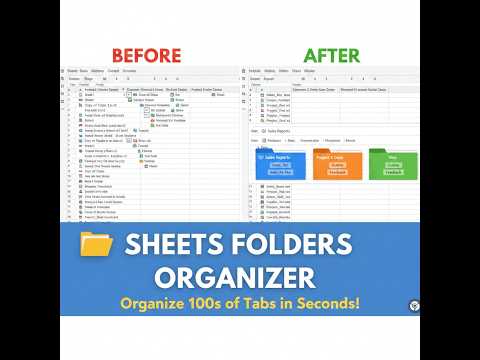
Stop scrolling through endless tabs. Big Google Sheets workbooks slow you down. 20, 30, sometimes 100+ tabs per spreadsheet. Sheets Folder Organizer groups them into folders so you can find what you need without hunting. Group related tabs together, click a folder to focus on what matters, jump between views in one click. Your workbook stays exactly the same. Only the way you navigate it changes. Built for analysts, operators, finance teams, and anyone who lives inside Google Sheets with 15+ tabs per workbook. ✨ WHAT YOU GET 📁 Folders for your tabs. Group related sheets into named folders that persist across sessions. 🖱️ Drag and drop. Move a tab into a folder by dragging it. No menus. 🎨 Color-coded folders. Every folder gets a distinct auto-assigned color so your eye finds it instantly. 🎠 Carousel navigation. Browse folder tabs in a scrollable carousel instead of a cramped strip. Sort by original folder order, last opened, most used, or alphabetical. 🕒 Recent folder. Jump back to sheets you were just working on (optional). 🔒 Local-first and private. All folder data is stored on your device. No accounts, no servers, no tracking. 🧊 Zero changes to your spreadsheet. Folders live in the UI, not in your data. Share your sheet with anyone and they see a normal workbook. 🚀 GET MORE WITH PRO ($14.99, one-time) The free version handles 3 folders for everyday use. Pro unlocks the full power for serious workbooks: ✓ Unlimited folders. Organize 10, 50, 100+ categories without limits. ✓ Hide organized sheets. Declutter the native bottom bar so it only shows sheets you haven't grouped yet. ✓ Drag to reorder folders. Set the order you actually work in. ✓ Custom folder colors. Pick the colors that match your workflow. ✓ Import and export your folder structure. Back up your setup, sync across machines, or share layouts with teammates. One-time purchase. No subscription. Free updates. HOW TO USE 1. Open any Google Sheet 2. Click the "+" button to create a folder 3. Drag any tab into a folder 4. Click a folder to focus on its tabs That's it. No setup, no signup. PRIVACY All folder data is stored locally on your device using Chrome's storage API. We don't see your data. We don't track your usage. We don't transmit anything about your spreadsheets. The extension only requests access to docs.google.com/spreadsheets to inject the folder bar into the page. Built by LookWithin Labs.
0 out of 5No ratings
Details
- Version1.0.1
- UpdatedMay 30, 2026
- Offered byLookWithin Labs
- Size85.79KiB
- LanguagesEnglish (United States)
- DeveloperLookWithIn Labs
Email
support@lookwithinlabs.com - Non-traderThis developer has not identified itself as a trader. For consumers in the European Union, please note that consumer rights do not apply to contracts between you and this developer.
Privacy

Sheets Folder Organizer has disclosed the following information regarding the collection and usage of your data. More detailed information can be found in the developer's privacy policy.
Sheets Folder Organizer handles the following:
This developer declares that your data is
- Not being sold to third parties, outside of the approved use cases
- Not being used or transferred for purposes that are unrelated to the item's core functionality
- Not being used or transferred to determine creditworthiness or for lending purposes
Support
For help with questions, suggestions, or problems, please open this page on your desktop browser