

SheetLink: Sync Bank Transactions to Google Sheets

Overview
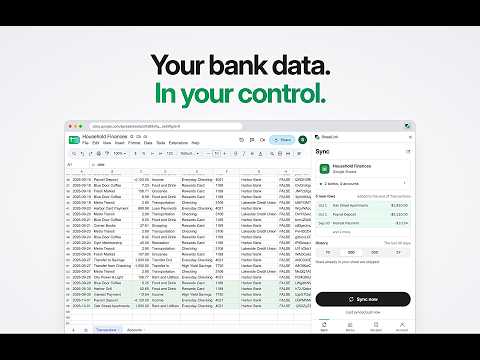
Press sync and your bank transactions land in your own Google Sheet. 10,000+ US and Canadian banks through Plaid. Free to start.
SheetLink is a Chrome extension that copies your bank and credit card transactions into a Google Sheet you choose. Budget, track expenses and build your own reports in a spreadsheet you own, with real data from your accounts. It works like a bank feed for a sheet you already use. Connect a bank through Plaid, pick your sheet and press Sync. New transactions are added to the end of the sheet, and rows already there are never added twice. USE IT FOR • A monthly or 50/30/20 budget that fills in from your real spending. • Expense tracking across every checking, savings and credit card account in one place. • Finding subscriptions and other recurring charges. • Cash flow forecasts, pivot tables, charts and your own formulas. Free templates that fill in from SheetLink: https://sheetlink.app/blog/free-google-sheets-budget-templates HOW IT WORKS 1. Sign in with Google. 2. Connect a bank: 10,000+ banks, credit unions and card issuers in the US and Canada. 3. Choose a sheet you can edit. SheetLink writes into it; it never creates one. 4. Press Sync. SheetLink adds a Transactions tab and an Accounts tab and keeps them up to date. Keep SheetLink in Chrome's side panel next to your sheet, or use the popup. Dark mode follows your system, and when a bank needs attention, a Reconnect button is right there. WHAT LANDS IN YOUR SHEET Every plan writes the same 34 columns for each row: date, description, merchant, amount, account, categories, pending status, location and more. Positive amounts are money out and negative amounts are money in. The Accounts tab lists each account with its current and available balance. YOU STAY IN CONTROL • Nothing is written to your sheet until you press Sync. • Pick which banks and accounts sync. Turning one off only stops new rows; nothing in your sheet is deleted. • Choose how far back to pull: 7, 30 or 90 days, 2 years, or your own dates. • Rename banks and accounts in SheetLink; your sheet keeps their real names. RECIPES Recipes add ready-made analysis to your sheet's menu: Budget Tracker, Budget Tracker (by Account), Recurring Spend Detector and Cash Flow Forecast, plus community recipes like the Financial Statements Suite. Recipe code is open source on GitHub. PLANS Free: the last 7 days of history from one bank, in Google Sheets. Pro, $4.99 a month or $49 a year: up to 2 years of history from every bank, plus the Excel add-in. Max, $10.99 a month or $99 a year: everything in Pro, plus investment holdings and activity in their own tabs, CLI automation with API keys (JSON, CSV, Postgres or SQLite), and Claude through the SheetLink MCP server. Cancel any time. PRIVACY AND SECURITY • SheetLink doesn't store your transactions. They pass from Plaid through SheetLink into your sheet. • Your bank login goes to Plaid, never to SheetLink. • Bank connection tokens are encrypted at rest. • SheetLink only writes to the sheet you choose. • We don't sell or share your data. Privacy policy: https://sheetlink.app/privacy Security: https://sheetlink.app/security QUESTIONS When does SheetLink sync? When you press Sync. Your sheet only changes when you ask, and rows already there are skipped. Can I use Excel instead? This extension writes to Google Sheets. Pro and Max also include the SheetLink add-in for Excel on Windows, Mac and the web. Do I need a new spreadsheet? No. Use a sheet you already have, or start from one of the free templates above. REQUIREMENTS A Google account (personal, or Workspace if your admin allows it), a bank Plaid supports, and a Google Sheet you can edit. SUPPORT Email support@sheetlink.app and a person will answer. Docs: https://sheetlink.app/docs Source code: https://github.com/sheetlink/extension
5 out of 58 ratings
Details
- Version0.9.5
- UpdatedOctober 10, 2026
- FeaturesOffers in-app purchases
- Size388KiB
- LanguagesEnglish (United States)
- DeveloperWebsite
Email
support@sheetlink.app - Non-traderThis developer has not identified itself as a trader. For consumers in the European Union, please note that consumer rights do not apply to contracts between you and this developer.
Privacy

SheetLink: Sync Bank Transactions to Google Sheets has disclosed the following information regarding the collection and usage of your data. More detailed information can be found in the developer's privacy policy.
SheetLink: Sync Bank Transactions to Google Sheets handles the following:
This developer declares that your data is
- Not being sold to third parties, outside of the approved use cases
- Not being used or transferred for purposes that are unrelated to the item's core functionality
- Not being used or transferred to determine creditworthiness or for lending purposes
Support
For help with questions, suggestions, or problems, visit the developer's support site