

SheetGrab: Web Scraper for Tables & Lists to Excel, CSV

Overview
Scrape tables, lists and product grids from any website to Excel, CSV or Google Sheets. Auto-collect every page and find leads.
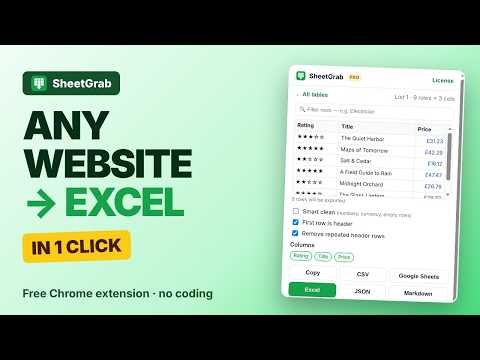
SheetGrab is the easiest way to scrape tables, lists and product grids from any website and save them to Excel, CSV or Google Sheets. Just open a page, click the icon, and your data is ready in seconds. No coding, no messy copy and paste, no setup. Why people use SheetGrab Copying data from websites by hand is slow and the formatting always breaks. SheetGrab finds every table and repeated list on the page for you, shows you a clean preview, and exports it with the columns lined up perfectly. When the results are spread over many pages, SheetGrab can move through them automatically and combine everything into one spreadsheet. Free features • Automatically detects tables, lists, product grids, search results and directory listings • Preview the data before exporting and filter rows by any word • Export to CSV, copy to the clipboard, or paste straight into a new Google Sheet • Pulls emails, phone numbers, websites and social profile links from listings into their own columns • Reads tables inside embedded frames, such as embedded Google Sheets • Uses the first row as headers and removes repeated header rows • Opens instantly with the shortcut Alt+Shift+S SheetGrab Pro: $9 one time, no subscription • Download real Excel (.xlsx) files • Unlimited rows (the free plan exports the first 100 rows) • Auto collect every page: follows Next buttons, page numbers, Load more buttons and infinite scroll, up to 50 pages per run, and keeps working even after you close the popup • Pick Next button: click the site's Next link once and SheetGrab remembers it for that website • Lead mode: visit the business websites in your list and find their contact emails, phone numbers and social profiles • Export every table on a page into a single Excel workbook • Smart clean turns prices and numbers into real numbers and removes empty rows • Choose exactly which columns to keep • Export to JSON and Markdown • Build your own collection from several pages • Activate in seconds: paste your license key once and Pro switches on instantly Who it's for SheetGrab helps sales teams build lead lists from business directories, online sellers track competitor prices, researchers and students save tables and statistics, and anyone who needs web data in a spreadsheet without writing code. How it works 1. Open any web page with a table or list 2. Click the SheetGrab icon or press Alt+Shift+S 3. Choose the table or list you want, then preview and filter it 4. Click Excel, CSV, Copy or Google Sheets 5. With Pro, click Auto collect all pages to grab every page of results at once Your privacy matters SheetGrab only reads a page when you click it. Your data is processed inside your own browser and your files are created on your computer. There is no account, no tracking and no analytics. SheetGrab connects to Gumroad only to check a Pro license key. Websites you choose for contact lookup are visited only when you start that feature. Access to other sites is optional and requested only when you need it. Please use contact details responsibly and follow the laws that apply to you, such as GDPR and anti-spam rules. Need help or have an idea? Email extensionspro36@gmail.com and we will get back to you.
0 out of 5No ratings
Details
- Version2.0.0
- UpdatedNovember 19, 2026
- Offered byextensionspro36@gmail.com
- Size123KiB
- LanguagesEnglish
- Developer
Email
extensionspro36@gmail.com - Non-traderThis developer has not identified itself as a trader. For consumers in the European Union, please note that consumer rights do not apply to contracts between you and this developer.
Privacy

SheetGrab: Web Scraper for Tables & Lists to Excel, CSV has disclosed the following information regarding the collection and usage of your data. More detailed information can be found in the developer's privacy policy.
SheetGrab: Web Scraper for Tables & Lists to Excel, CSV handles the following:
This developer declares that your data is
- Not being sold to third parties, outside of the approved use cases
- Not being used or transferred for purposes that are unrelated to the item's core functionality
- Not being used or transferred to determine creditworthiness or for lending purposes