

SharePoint Wiki from Markdown

Overview
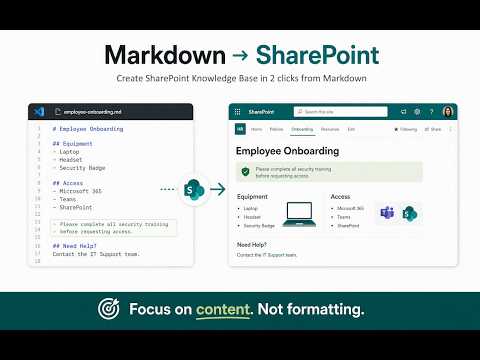
Import Markdown to SharePoint Site Pages. Build a SharePoint wiki or knowledge base from MD - draft-safe with preview.
Markdown is now the default format for AI drafts and docs-as-code. SharePoint Wiki from Markdown exists so that knowledge can land on modern Site Pages without rebuilding every guide by hand in the editor. Stop copy-pasting into the Text web part when the source is already Markdown. Paste text or a .md file, Preview the structure, then import into the page canvas as draft. This MD to SharePoint import tool writes real Site Page content — not just a library file or a Markdown web part — while authors keep writing where they already work. ✨ Key benefits of this SharePoint page creator tool 1️⃣ Preview structure before anything is written to the page 2️⃣ Import finishes as a draft by default so you publish when ready 3️⃣ On a non-empty page you choose Replace or Append on purpose 4️⃣ Images from https and data URLs upload into Site Assets on import 5️⃣ Auto TOC on Markdown import — table of contents for long guides and policy pages 6️⃣ Tools → TOC from Page — build or refresh a TOC from headings already on Site Pages (apply to one or many pages, or just copy the HTML — no Markdown re-import) 7️⃣ Auto SharePoint breadcrumbs so readers can move across a section 🛡️ Simple and Secure – This extension uses your existing SharePoint user permissions, so there’s no need for an SPFx project or IT request for PnP API. 🧭 How it works • Open the modern Site Page where the content should live • Paste Markdown or choose a .md file in the side panel • Review Preview until headings and lists look right • Run Import, then confirm draft status in the result report • Reload the page and share the draft for review • Publish yourself when the org is ready 🧰 Page already live and missing a TOC? Open Tools in the side panel → TOC from Page. Pick the current page or several Site Pages, preview the TOC, then Apply into the canvas or Just Copy the HTML. 🛠️ Need a whole section, not one page? As an SP wiki builder tool, SharePoint Wiki from Markdown also batch-publishes from a tree of guides — create pages, mirror folders, and keep imports predictable with TOC and breadcrumbs where you need them. 🎯 Real-world use cases - Draft a page template with AI in Markdown, then drop it into SharePoint in one pass - Write in Google Docs, export as Markdown, and import the clean structure onto a Site Page - Migrate an old wiki such as Obsidian into SharePoint through the Markdown format you already keep - Generate a whole knowledge section with AI, then upload the full tree with navigation, breadcrumbs, and TOC - Refresh TOC on existing Site Pages after heading edits — without re-importing Markdown - Ship policy handbooks, runbooks, and consultant drafts as draft pages ready for review 👥 Who it’s for 1. Intranet editors tired of paste-and-fix in the Text web part 2. Knowledge managers moving Git or AI Markdown onto Site Pages 3. Technical writers who want a sharepoint wiki without living in WYSIWYG 4. Comms owners who need draft review before the whole org sees an update ❓ FAQ from real publisher questions ▸ Does SharePoint support Markdown as a real Site Page, or only as a file? The MD importer writes into the page canvas — normal Site Page content, not just a stored .md file. ▸ Why not just use the sharepoint markdown web part? The web part keeps Markdown inside one part. RTE canvas formatting is wider for everyday editing, and version history shows richer page diffs after updates. ▸ Why might this extension ask for access beyond SharePoint? Only when your Markdown has remote http(s) image URLs. After an in-extension explainer you can allow fetch into Site Assets, or skip and leave those images as ordinary links on the page. ▸ Will Import publish my page to everyone? No. Draft is the default. You publish when reviewers are ready. ▸ What if the page already has content — will it wipe everything? You choose Replace or Append before write. Nothing is overwritten silently. ▸ Formatting keeps breaking when I paste into the Text web part. Does this help? Yes, when the source is Markdown. Skip paste-and-fix and land structured content in one pass. ▸ Can I create pages in bulk from a folder of Markdown? Yes. Select multiple .md files or a tree, then create pages with optional folder mirroring, breadcrumbs, and TOC where you need them. ▸ Can I add a TOC to pages that already exist — without Markdown? Yes. Tools → TOC from Page reads H2 headings on the Site Page, then applies a TOC into the canvas or copies the HTML. Works on one page or a batch. 🔒 Privacy and permissions Runs in your browser on pages you can already edit. Install requires SharePoint host access only. Broader host access is never required up front — it is optional and requested only when an import includes remote http(s) image URLs (after an in-extension explainer), solely to fetch those images into Site Assets. You can skip; content stays inside your Microsoft 365 permissions. 🚀 Ready to try SharePoint Wiki from Markdown on a real guide? Open a Site Page, paste your content, Preview, Import as draft, then publish when reviewers say go. ©️ This extension is an independent product and is not affiliated with, endorsed by, or sponsored by Microsoft Corporation. SharePoint, Microsoft 365, and related names are trademarks of their respective owners. Apps for SharePoint listed here are not Microsoft-branded Microsoft products.
0 out of 5No ratings
Details
- Version0.2.1
- UpdatedAugust 4, 2026
- Offered bydreambuilder.first
- Size285KiB
- LanguagesEnglish
- Developer
Email
dreambuilder.first@gmail.com - Non-traderThis developer has not identified itself as a trader. For consumers in the European Union, please note that consumer rights do not apply to contracts between you and this developer.
Privacy

This developer declares that your data is
- Not being sold to third parties, outside of the approved use cases
- Not being used or transferred for purposes that are unrelated to the item's core functionality
- Not being used or transferred to determine creditworthiness or for lending purposes