

ShapeSnip — 15 Shape Screen Clipper
Overview
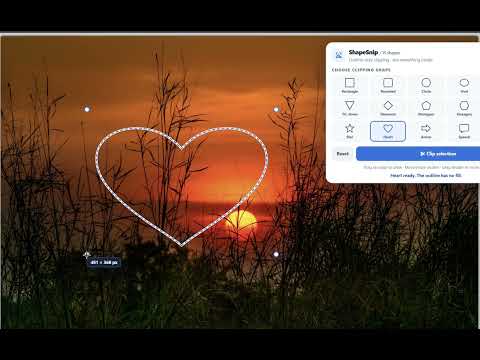
Clip any of 15 see-through shapes on webpages and export the selection as a transparent PNG. All editing remains on your computer.
# ShapeSnip – Creative Screen Capture & Shape Clipping Tool **Capture beyond the rectangle.** ShapeSnip brings a creative twist to traditional screenshots. Instead of being limited to rectangular screen captures, ShapeSnip lets you capture content using distinctive shapes for presentations, design projects, crafting, and everyday use. Whether you're creating visual content, saving information, or preparing images for a project, ShapeSnip gives you more flexibility over how your screenshots look. ### Key Features **Creative Shape-Based Screen Captures** Go beyond traditional rectangular screenshots with a selection of clipping shapes that make capturing visual content more versatile. **Precision Screen Clipping** Select the exact area of your screen you want to capture, making it easier to focus on important content. **Creative Tools for Different Projects** Use shaped captures for presentations, educational materials, digital crafting, visual references, and creative projects. **Flexible Image Export** Save your captures in supported image formats for use in other applications and creative workflows. **Simple, Convenient Workflow** Launch ShapeSnip directly from Chrome, choose your capture shape, select your content, and save your result. ### Perfect For - **Crafters and designers** creating unique visual elements. - **Students and educators** preparing engaging learning materials. - **Business professionals** building presentations and training content. - **Content creators** developing graphics and visual references. - **Everyday users** who want more flexibility than a standard screenshot tool. ### Why Choose ShapeSnip? Traditional screenshot tools focus on rectangular captures. ShapeSnip combines the convenience of browser-based screen capture with creative shape selection to help you make more distinctive images. **Capture it. Shape it. Save it.** Discover a more creative way to take screenshots with ShapeSnip.
0 out of 5No ratings
Details
- Version1.2.0
- UpdatedNovember 6, 2026
- Offered byCrestpoint Ventures LLC
- Size28.89KiB
- LanguagesEnglish (United States)
- DeveloperCrestPoint Ventures LLC
971 US-202 Branchburg, NJ 08876 USEmail
support@mailslatepro.comPhone
+1 732-399-2629 - TraderThis developer has identified itself as a trader per the definition from the European Union and committed to only offer products or services that comply with EU laws.
Privacy

ShapeSnip — 15 Shape Screen Clipper has disclosed the following information regarding the collection and usage of your data. More detailed information can be found in the developer's privacy policy.
ShapeSnip — 15 Shape Screen Clipper handles the following:
This developer declares that your data is
- Not being sold to third parties, outside of the approved use cases
- Not being used or transferred for purposes that are unrelated to the item's core functionality
- Not being used or transferred to determine creditworthiness or for lending purposes