


Overview
Why install Shadow Writer AI Writing context-rich emails (follow-ups, proposals, meeting requests) takes time. Shadow Writer AI…
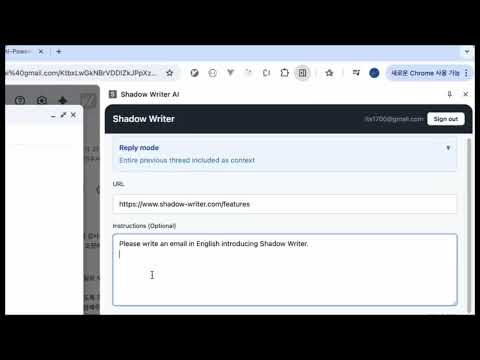
Why install Shadow Writer AI Writing context-rich emails (follow-ups, proposals, meeting requests) takes time. Shadow Writer AI turns URLs, notes, and your instructions into polished email drafts inside Gmail, so you spend less time drafting and more on what matters. What it does AI email drafting — Open the side panel next to your Gmail compose window, add instructions, and optionally attach context: paste a public web page URL (Pro) and/or upload a PDF (reports, scans, exported documents—text is extracted in your browser). The extension uses that context plus your current thread to generate a subject and body. One click inserts the draft into your email. 【Thread-aware replies — When you reply to an email, Shadow Writer AI automatically reads the entire conversation history and uses it as context. It understands who said what, catches the tone of the discussion, and drafts a reply that fits naturally into the thread—no copy-pasting or summarizing previous messages yourself.】 Smart context — It combines the thread you're replying to, your instructions, and optional reference material: uploaded PDFs (any PDF, processed locally) and, on Pro, scraped text from public web URLs. Google Docs, Sheets, or Slides are not loaded automatically—export as PDF and upload like any other file so the draft fits the conversation and your goal. Prompt helper — One-click buttons add tone (Formal, Casual, Friendly) and purpose (Sales, Customer Support, Meeting Request, Report) to your instructions so you get the right style without writing long prompts. Multi‑model comparison (Pro) — Generate with one AI by default, then optionally request drafts from Gemini or Claude and compare them in tabs to pick the best version. Who it's for Sales, project managers, consultants, and anyone who writes a lot of context-based emails in Gmail. Free tier includes a monthly credit allowance; Pro adds more credits, public URL scraping, PDF upload, and multi-LLM comparison. Try it Install Shadow Writer AI to draft emails faster without leaving Gmail.
0 out of 5No ratings
Details
- Version1.0.2
- UpdatedMarch 31, 2026
- Size610KiB
- LanguagesEnglish (United States)
- Developer
- Non-traderThis developer has not identified itself as a trader. For consumers in the European Union, please note that consumer rights do not apply to contracts between you and this developer.
Privacy

Shadow Writer AI - Email Writer for Gmail has disclosed the following information regarding the collection and usage of your data. More detailed information can be found in the developer's privacy policy.
Shadow Writer AI - Email Writer for Gmail handles the following:
This developer declares that your data is
- Not being sold to third parties, outside of the approved use cases
- Not being used or transferred for purposes that are unrelated to the item's core functionality
- Not being used or transferred to determine creditworthiness or for lending purposes