


Overview
Hide, blur, or replace distracting album art on YouTube Music. Work and study in peace with instant privacy controls.
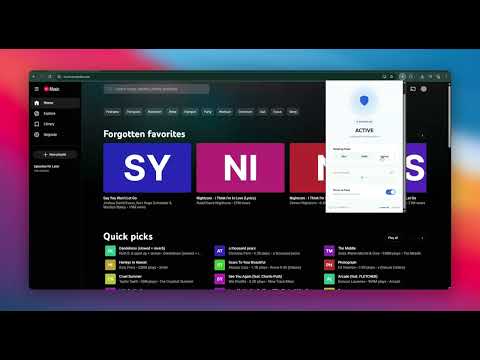
Keep your screen professional. Enjoy your music without the distractions. When listening to music at work, school, or in public spaces, YouTube Music displays large, vibrant, and sometimes unprofessional album art on your screen. SFW Mode for YouTube Music is an independent, lightweight Chrome extension designed to keep your workspace clean and professional. It automatically hides, blurs, or replaces album artwork across the YouTube Music platform, allowing you to focus on your tasks without visual distractions. 🚀 Core Features 🛡️ Dynamic Masking Modes: Customize how artwork is hidden with three distinct styles: Blur Mode: Softly blurs the artwork, maintaining ambient background colors for a modern aesthetic. Solid Mode: Replaces the image with a clean, solid color dynamically matched to the song's color scheme. Initials Mode: Replaces the artwork with a minimalist color block showing the song or artist's initials. 👁️ Hover-to-Peek (Curiosity Mode): Need to identify a track? Simply hover your mouse pointer over any masked thumbnail to temporarily reveal the original artwork. The artwork is masked again the moment you move your mouse away. 🎛️ Adjustable Blur Intensity: Take full control of your visual privacy. Use the slider in the control panel to choose anything from a light, semi-transparent blur to a completely opaque mask. ⚡ Emergency Keyboard Shortcut (Alt + Shift + B): Toggle protection on or off instantly. A discreet way to maintain privacy when a colleague or supervisor approaches your desk. 📱 Premium Control Panel Manage your privacy on the fly with our sleek, intuitive popup dashboard: One-Click Master Toggle: Turn SFW Mode on or off instantly. Animated Status Indicator: A clear status badge to verify your protection settings at a glance. Smooth Mode Switcher: Seamlessly toggle between Blur, Solid, and Initials modes. 🔒 Privacy & Security First Zero Data Collection: We do not collect, store, or transmit your browsing history, personal data, or YouTube Music activity. Local Processing: All modifications and styling happen entirely on your local device. Lightweight: Built with optimized code to ensure zero impact on your browser's performance or battery life. ❓ How to Use Install the extension. Open YouTube Music Click the extension icon in your browser toolbar to customize your preferred masking mode. Use Alt + Shift + B anytime to instantly toggle protection.
0 out of 5No ratings
Details
- Version26.3.10
- UpdatedJuly 6, 2026
- Size28.62KiB
- LanguagesEnglish
- DeveloperWebsite
Email
piyushraut27@gmail.com - Non-traderThis developer has not identified itself as a trader. For consumers in the European Union, please note that consumer rights do not apply to contracts between you and this developer.
Privacy

This developer declares that your data is
- Not being sold to third parties, outside of the approved use cases
- Not being used or transferred for purposes that are unrelated to the item's core functionality
- Not being used or transferred to determine creditworthiness or for lending purposes
Support
For help with questions, suggestions, or problems, visit the developer's support site