

Overview
Save links and screenshots to your private Sevit library.
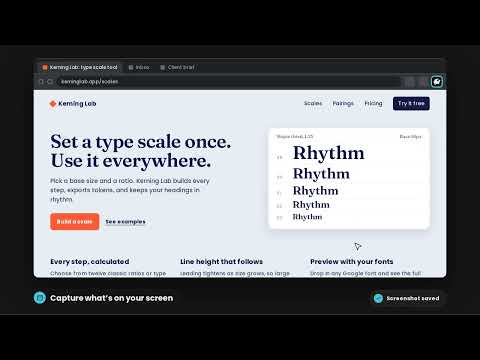
Save what's worth remembering — without leaving the page. Sevit Capture is the Chrome companion to Sevit (sevit.id), a private visual library for the links, screenshots and references you find online. Click the Sevit icon on any page and keep it in one place, ready to find again when you need it. WHAT YOU CAN DO • Save link — keep the page you're on. Edit the title and add a note before saving. Sevit fills in the preview image and details for you. • Capture screen — save exactly what you can see. • Select area — drag a box around the part of the page you want. • Capture full page — Sevit scrolls the whole page and joins it into one image, with progress shown as it goes. EVERYTHING LANDS IN YOUR SEVIT LIBRARY Your saves appear straight away in your library on the web and in the Sevit app, where you can organise them with tags and collections, search them, and share a collection with a single link when you want to. PRIVATE BY DEFAULT • Your library is private. Nothing is visible to anyone unless you choose to share a collection. • The extension only acts when you click it, and only on the tab you choose. • It does not read your browsing history and sends nothing to advertisers. • Screenshots are stored in your library, not on the page you captured. GETTING STARTED 1. Create a free account at sevit.id. 2. Click the Sevit icon and sign in with your Sevit email and password. (Signed up with Google? Set a password first under Account → Security on sevit.id.) 3. Open any web page and save. Note: Chrome doesn't let extensions work on its own pages, such as chrome:// pages and the Chrome Web Store. Help: https://sevit.id/support Privacy: https://sevit.id/info/privacy
0 out of 5No ratings
Details
- Version0.1.3
- UpdatedSeptember 27, 2026
- Size67.94KiB
- Languages2 languages
- DeveloperSCND DigitalWebsite
Komp. Deplu 76 Jl. Caraka 6 Blok C No. 23 Tangerang Selatan, Banten 15224 IDEmail
connect@scnd.digitalPhone
+62 816-701-220 - TraderThis developer has identified itself as a trader per the definition from the European Union and committed to only offer products or services that comply with EU laws.
Privacy

Sevit Capture has disclosed the following information regarding the collection and usage of your data. More detailed information can be found in the developer's privacy policy.
Sevit Capture handles the following:
This developer declares that your data is
- Not being sold to third parties, outside of the approved use cases
- Not being used or transferred for purposes that are unrelated to the item's core functionality
- Not being used or transferred to determine creditworthiness or for lending purposes
Support
For help with questions, suggestions, or problems, please open this page on your desktop browser