


Overview
Save website login sessions and restore them in another browser. End-to-end encrypted. No account required.
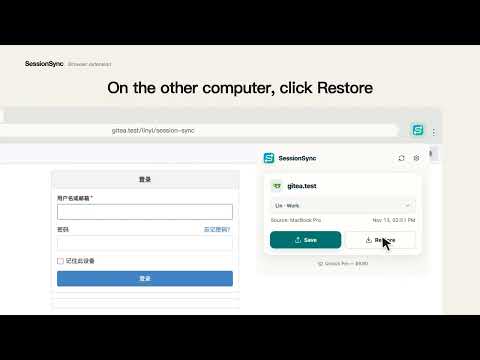
Your main browser is signed in. The other one isn’t. SessionSync saves a website’s login session so you can restore it in another browser — on the same computer, in a virtual machine, or on a remote desktop. Both browsers must support Chrome extensions. No email account is required. Watch the 25-second demo: https://session-sync.talkape.net/ SAVE HERE. RESTORE THERE. 1. Create a sync key, back it up, and import it in your other browser. 2. Open a signed-in website, review the preview, and click Save. 3. Open the same website in the other browser, select your saved profile, and click Restore. Keep named profiles for different accounts. Save and restore when you choose; there is no continuous background sync. Undo the most recent restore if needed. WHAT IT CAN MOVE • Supported cookies, localStorage and sessionStorage from accessible website frames. • Pro can optionally include supported JSON-compatible IndexedDB records. This is off by default. • Each profile keeps one cloud snapshot. Saving again updates it. ENCRYPTED BEFORE UPLOAD Session contents and device names are encrypted locally with AES-256-GCM and HKDF-SHA-256. The server stores encrypted snapshots and does not receive your sync key. It can see website origins, timestamps, usage and payment metadata. Back up your key: the service cannot recover it. LIMITS TO KNOW Sessions can expire or be bound to a device. Websites may still require a normal sign-in or security check. Cloud and AI browsers that do not support Chrome extensions cannot use SessionSync. Try your usual websites on Free first. FREE AND PRO Free includes 3 websites, 2 profiles per website, 10 MiB total encrypted cloud storage and 5 MiB per profile. Pro is a one-time purchase: unlimited websites and profiles within 100 MiB total storage, up to 20 MiB per profile, plus optional IndexedDB support. Upgrade or redeem a gift code in Settings → Pro. Storage limits count encoded encrypted session data. Requires Chrome 132 or later. Guides: https://session-sync.talkape.net/guides Security: https://session-sync.talkape.net/security Privacy: https://session-sync.talkape.net/privacy#en
5 out of 53 ratings
Details
- Version2.1.5
- UpdatedNovember 23, 2026
- FeaturesOffers in-app purchases
- Size66.67KiB
- Languages3 languages
- Developer
- TraderThis developer has identified itself as a trader per the definition from the European Union and committed to only offer products or services that comply with EU laws.
Privacy

SessionSync — Sync Website Logins has disclosed the following information regarding the collection and usage of your data. More detailed information can be found in the developer's privacy policy.
SessionSync — Sync Website Logins handles the following:
This developer declares that your data is
- Not being sold to third parties, outside of the approved use cases
- Not being used or transferred for purposes that are unrelated to the item's core functionality
- Not being used or transferred to determine creditworthiness or for lending purposes
Support
For help with questions, suggestions, or problems, please open this page on your desktop browser