

Sermon Notetaker

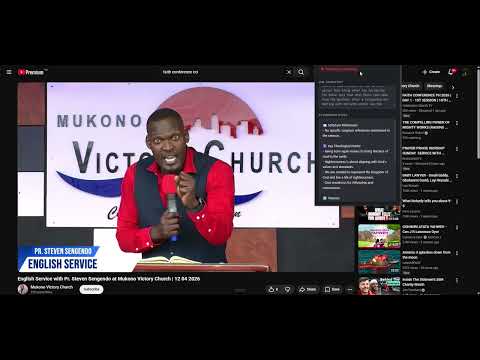
Overview
Automatically captures sermon audio and summarizes key points using AI.
Your Personal AI Notetaker for Sermons & Talks Sermon Scribe AI works entirely in the background—listening to any audio playing in your Chrome browser and automatically generating clear, structured sermon notes. No typing, no clicking during the message. How It Works (Fully Automated) Open any sermon, Bible study, or lecture in Chrome (live stream, YouTube, podcast, church website, etc.). Sermon Scribe AI listens to the browser audio in real time—no microphone access needed. The AI processes the spoken content and writes structured notes including: Main topic & Scripture references Key points & subpoints Illustrations & applications Quotable statements Actionable takeaways Key Features Hands-free & non-intrusive – No buttons to press during the message. Start it once, and it runs automatically. Browser audio only – Works with any tab that plays audio. Does NOT use your microphone, so it won’t pick up room noise or conversations. Real-time or post-sermon – Generate notes as the sermon plays or process a recording afterward. Structured output – Notes are organized for easy review, teaching, or sharing. Editable & exportable – Copy to clipboard, export as text, Markdown, PDF, or send to Google Docs/Notion. Supports multiple speakers – Distinguishes between main preacher, prayers, and Scripture reading where possible. No cloud dependency (optional) – Local processing available for privacy (depending on your AI backend setup). Perfect For Pastors & ministry leaders reviewing sermons Bible students & small group leaders preparing discussion guides Church volunteers creating bulletins or summaries Anyone who wants to focus on listening, not note-taking Privacy First Sermon Scribe AI does not record or store audio without your permission. All processing can be done locally, and no audio leaves your device unless you choose a cloud AI option. How to Use Install the extension. Pin it to your toolbar. Play any sermon or teaching in a Chrome tab. Click “Start Listening” once. Get structured notes automatically when the message ends. Requirements Chrome browser (desktop) Internet connection for optional cloud AI (local mode available) Support & Feedback We’re actively improving Sermon Notetaker. We are open to feature requests or bug reports.
0 out of 5No ratings
Details
- Version1.0
- UpdatedApril 16, 2026
- Offered byowaiowai30
- Size33.52KiB
- LanguagesEnglish (United States)
- Developer
Email
owaiowai120@gmail.com - Non-traderThis developer has not identified itself as a trader. For consumers in the European Union, please note that consumer rights do not apply to contracts between you and this developer.
Privacy

This developer declares that your data is
- Not being sold to third parties, outside of the approved use cases
- Not being used or transferred for purposes that are unrelated to the item's core functionality
- Not being used or transferred to determine creditworthiness or for lending purposes
Support
For help with questions, suggestions, or problems, please open this page on your desktop browser