


Overview
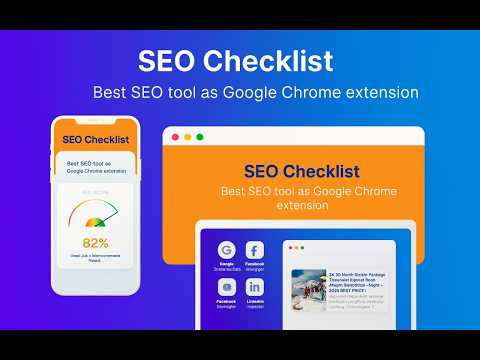
Real-time on-page SEO analysis with social preview insights and quick access to SEO testing tools
SEO Checklist v1.3 – On-Page SEO Analyzer Chrome Extension SEO Checklist is a modern, privacy-friendly Chrome extension that provides instant, client-side on-page SEO analysis for any website you visit. It gives you a clear, actionable checklist and visual feedback to help you optimize your pages for search engines—no server, no data collection, no permissions beyond what’s needed. --- 🔍 Key Features - No Permissions Needed Beyond Active Tab: All analysis is performed client-side. No data leaves your browser. - One-Click Analysis: Instantly analyze the current tab’s HTML with a single click. - Visual SEO Score: Get a color-coded SEO score and feedback summary. - Detailed Checklist: Checks for: -- Title tag length (50–60 chars) -- Meta description length (120–160 chars) -- Heading structure (1 H1, multiple H2s) -- Content length (500+ words) -- Image alt texts -- Internal links -- Mobile viewport tag -- Canonical tag -- Schema markup -- Google Analytics / GA Tag implementation - Color-Coded Status: Good, Warning, and Needs Work indicators for each check. - Tooltips: Hover for actual content and recommendations. - Accordion UI: Expand/collapse categories for a clean, modern look. - Loading Indicator: See when analysis is running. - Google Analytics Detection: Detects if Google Analytics or Google Tag Manager is installed on your page - Social Preview Card: Preview social metadata (title, description, image, URL) directly in the extension popup. - Broken Link Check Status: Checks internal links and reports broken-link status for faster technical cleanup. - Test Recent URL Tools: Quick access to external SEO testing tools: -- Structured Data / Rich Results – Test with Google's Rich Result Testing Tool -- Google PageSpeed Insights – Analyze page performance and loading speed -- Facebook Sharing Debugger – Preview how your page appears when shared on Facebook -- LinkedIn Post Inspector – Preview how your page appears when shared on LinkedIn -- Each tool opens in a new tab with your current page URL automatically pre-filled - Works on Most Pages: (Not available on Chrome Web Store, extensions, or chrome:// pages due to browser restrictions.) --- ✨ What’s New in v1.3 (May 2026) - Social Preview Analyzer: Instantly preview Open Graph and Twitter-style title, description, image, and URL metadata. - Quick SEO Testing Tool Launcher: Open Rich Results Test, PageSpeed Insights, Facebook Sharing Debugger, and LinkedIn Post Inspector with one click. - Broken Link Visibility: Better internal-link quality checks with status feedback in the popup. - Performance + Workflow Benefits: -- Reduce manual QA time for technical SEO checks. -- Catch metadata and sharing-preview issues before publishing. -- Validate on-page SEO and off-page sharing readiness from one extension. ✨ What’s in v1.2.9 - Reduced permissions for safer browsing. - Improved heading order validation. - Internal & external link insights with detailed breakdowns. - Discernible link names check for accessibility. - Exportable PDF reports aligned with active features. --- 🚀 Why Choose SEO Checklist? - Save time on manual SEO QA. - Catch metadata and sharing‑preview issues before publishing. - Validate technical SEO and accessibility in seconds. - Free, open‑source, and continuously updated. --- 📥 Get Started - Install from Chrome Web Store (Check out this item on the Chrome Web Store https://chromewebstore.google.com/detail/jgigdhidhmgikfnccdnehcpgoggmagfh) - Watch the demo on YouTube (https://youtu.be/qd9OH9pfT7U) - Visit the product page (anupammondal.in in Bing) - Explore the GitHub repo (https://anupammondal.in/chrome-extension/seo-checklist) --- 🛠 Technical Highlights - Built with Chrome Extensions Manifest V3 API. - Lightweight, modular design for performance. - Works on most web pages (excluding Chrome Web Store, extensions, and chrome:// URLs). - Open‑source under MIT License.
4.3 out of 56 ratings
Details
- Version1.4
- UpdatedAugust 12, 2026
- Size53.38KiB
- LanguagesEnglish
- DeveloperAnupam MondalWebsite
Pratapnagar Metiari South 24 Parganas, West Bengal 743330 INEmail
a09051985@gmail.com - Non-traderThis developer has not identified itself as a trader. For consumers in the European Union, please note that consumer rights do not apply to contracts between you and this developer.
Privacy

SEO Checklist has disclosed the following information regarding the collection and usage of your data. More detailed information can be found in the developer's privacy policy.
SEO Checklist handles the following:
This developer declares that your data is
- Not being sold to third parties, outside of the approved use cases
- Not being used or transferred for purposes that are unrelated to the item's core functionality
- Not being used or transferred to determine creditworthiness or for lending purposes
Support
For help with questions, suggestions, or problems, please open this page on your desktop browser