


Overview
On-page SEO audit for the current tab: title, meta description, headings, images, links, social tags and structured data.
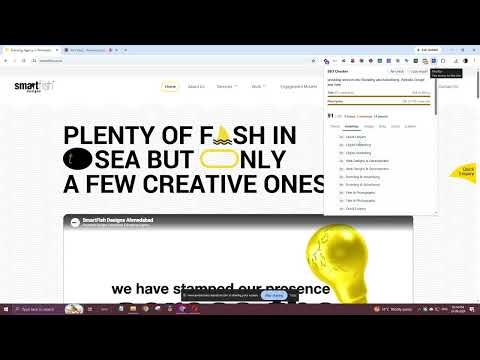
SEO Checker is an on-page SEO tool that lives in your browser toolbar. Open any webpage, click the icon, and you'll see how that page is likely to appear in Google search, along with an SEO score and a plain list of what's working, what needs attention, and what's broken. We built it for the quick checks SEO specialists, digital marketers, agencies, bloggers and web developers run every day, without having to open a full crawler or paste URLs into a separate SEO audit tool. GOOGLE SEARCH RESULT (SERP) PREVIEW See your page's title, URL and meta description the way they may show up in Google. The preview measures your title in pixels, not just characters, so you know exactly where Google is likely to cut it off. Color-coded length meters for the title and meta description tell you at a glance whether you're too short, too long or right where you need to be. 20+ ON-PAGE SEO CHECKS Content - Title tag length and pixel width - Meta description: missing, too short or too long - H1 tag: missing or used more than once - Heading structure, including skipped levels such as H2 straight to H4 - Word count, with a warning for thin content Indexing - Robots meta tag, so an accidental noindex or nofollow doesn't slip through - Canonical URL: missing, self-referencing or pointing to another page - HTTPS - Hreflang language alternates Technical - Mobile viewport meta tag - HTML lang attribute - Favicon Media and links - Images without alt text - Links with no anchor text - Internal and external link counts Social and schema - Open Graph tags (og:title, og:description, og:image) - Twitter/X card tags - Structured data (JSON-LD and microdata), including JSON-LD that fails to parse DETAILED TABS - Checks: every result, grouped and sorted by priority so the serious issues come first - Headings: the full H1 to H6 outline of the page - Images: thumbnails of every image, with missing alt text listed at the top - Links: internal, external and nofollow links, plus any links without text - Social: a preview of how the page looks when someone shares it - Schema: structured data types, canonical, robots, language and hreflang in one place ONE-CLICK SEO REPORT Copy a plain-text SEO report to your clipboard and paste it straight into a client email, audit notes, a Slack message or a task ticket. No reformatting needed. WHO USES THIS SEO TOOL - SEO professionals running fast on-page audits - Agencies checking client pages before and after changes go live - Content writers and bloggers reviewing a post before hitting publish - Developers confirming meta tags and schema after a release - Anyone curious about how competitors structure their pages PRIVATE BY DESIGN Everything runs locally in your browser. SEO Checker only reads a page when you click its icon, and nothing is collected, stored or sent anywhere. There's no account to create and no tracking. LIGHTWEIGHT The extension does nothing in the background and won't slow down your browsing. It runs only when you ask it to. GOOD TO KNOW SEO Checker audits on-page elements as they appear in your browser. It doesn't measure page speed, backlinks or keyword rankings. Pixel widths are close approximations of Google's desktop layout, which Google adjusts from time to time. Spotted a bug or have an idea for a feature? Reach us through the support link on this page.
0 out of 5No ratings
Details
- Version1.0.0
- UpdatedOctober 1, 2026
- Size25.42KiB
- LanguagesEnglish
- DeveloperWebsite
Email
arshad@smartfish.co.in - Non-traderThis developer has not identified itself as a trader. For consumers in the European Union, please note that consumer rights do not apply to contracts between you and this developer.
Privacy

SEO Checker has disclosed the following information regarding the collection and usage of your data. More detailed information can be found in the developer's privacy policy.
SEO Checker handles the following:
This developer declares that your data is
- Not being sold to third parties, outside of the approved use cases
- Not being used or transferred for purposes that are unrelated to the item's core functionality
- Not being used or transferred to determine creditworthiness or for lending purposes
Support
For help with questions, suggestions, or problems, visit the developer's support site