

SendReady — AI rewrite, reply & snippets

Overview
Instantly transform selected or typed text with AI — make it polite, translate, summarize, and more, in one click or trigger.
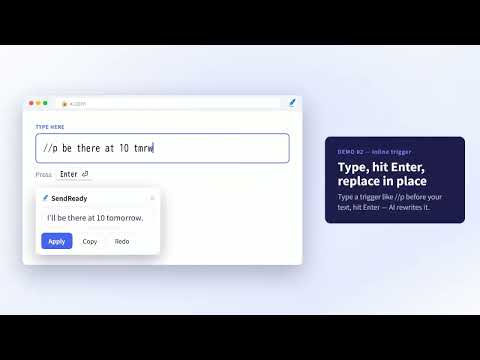
◆ What is SendReady SendReady turns the text you select or type into polished, translated, or summarized text, or a ready-to-send reply. It works in email, chat, social, docs, and contact forms. Anywhere you can type. No more copy-pasting into another AI tab. ◆ How it works Select your text or type a trigger in the field. Launch from the selection toolbar, the right-click menu, or the shortcut Alt+Shift+S. AI transforms it, and one tap drops the result back into the field. Read-only text is copied automatically. ◆ Key features ・AI presets: Polish, Translate, Summarize, Fix typos. Add up to 10 of your own (up to 200 characters). ・Snippets: Type a trigger like ;sig to instantly expand saved text. No AI, unlimited, up to 1,000 characters and 10 snippets. ・Write a reply: Select a received message and AI drafts a reply. Pick a tone, add a hint, then copy. ・3 ways to launch: Selection toolbar, right-click menu, or shortcut. A trigger alone works in any field. ・11 languages and dark mode: The interface follows your browser automatically. ◆ Privacy first ・Presets and settings stay in your browser, never collected externally. ・Only the text you select or type is sent to AI, never your whole page or history. ・Minimal permissions: no camera, microphone, or location. ◆ Pricing Completely free. No account, no API key. AI runs free up to 50 a day, snippet expansion unlimited.
0 out of 5No ratings
Details
- Version1.1.2
- UpdatedJune 23, 2026
- Offered bywarload57
- Size101KiB
- Languages11 languages
- Developer
Email
warload57@gmail.com - Non-traderThis developer has not identified itself as a trader. For consumers in the European Union, please note that consumer rights do not apply to contracts between you and this developer.
Privacy

This developer declares that your data is
- Not being sold to third parties, outside of the approved use cases
- Not being used or transferred for purposes that are unrelated to the item's core functionality
- Not being used or transferred to determine creditworthiness or for lending purposes
Support
For help with questions, suggestions, or problems, please open this page on your desktop browser