

SendReady: AI Rewrite & Reply Generator, Text Expander for Email & Chat
Overview
Rewrite text with AI, make emails polite, translate, fix grammar and generate replies in any text field. Plus a free text expander.
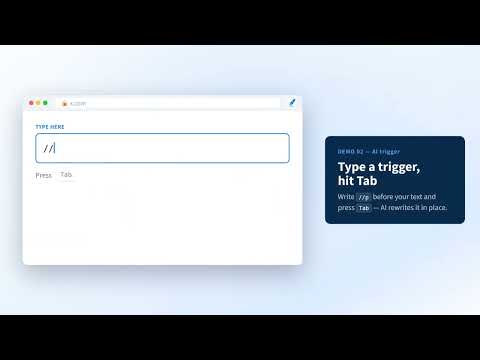
SendReady — rewrite, polish and reply with AI in any text field Stop copy-pasting into a chatbot tab. Select text in an email, a chat or almost any website, click the SendReady icon, and AI rewrites it on the spot — more polite, more professional, shorter, translated, or with typos and grammar fixed. Got a message you don't know how to answer? Select it, and SendReady drafts the reply for you. It's also a free text expander: type a short trigger like ;sig, press Tab, and your saved signature, greeting or template appears instantly. ━━━━━━━━━━━━━━━━━━ ✨ WHAT YOU CAN DO ━━━━━━━━━━━━━━━━━━ ✍️ AI rewriter & paraphraser — rewrite a sentence, a paragraph or a whole email in the style you pick 💼 Polite, professional emails — turn a blunt draft into a courteous, formal message ✅ Grammar & typo fixer — clean up mistakes without changing what you meant 🌏 Translate — into any language you name ("Translate to Spanish", "into natural English"…) 📝 Summarize — boil a long message down to the key points ↩️ AI reply generator — select an incoming email or chat, choose a tone, say what you want to answer, and get a ready-to-send reply ⚡ Text expander & snippets — insert templates with a trigger (no AI, fully local, unlimited) 🎨 Your own styles — type any instruction ("friendlier", "as bullet points", "shorter") or save up to 10 custom AI presets ━━━━━━━━━━━━━━━━━━ 🚀 HOW IT WORKS ━━━━━━━━━━━━━━━━━━ 1. Select text in a field (or anywhere on a page) 2. Click the SendReady icon that appears next to it 3. Pick a style — or type your own — and press Transform 4. Click Apply to swap it in place (read-only text is copied to your clipboard) Prefer the keyboard? Type "//p your text" in a field and press Tab — it's rewritten right there. You can also press Alt+Shift+S or use the right-click menu. Your last 5 results stay in History, so you can copy them again later. ━━━━━━━━━━━━━━━━━━ 💡 GREAT FOR ━━━━━━━━━━━━━━━━━━ • Replying to customers and clients by email • Polishing team chat messages before you hit send • Messages, comments and posts on social media • Writing in English as a second language • Support and sales teams who reuse the same answers every day ━━━━━━━━━━━━━━━━━━ 🔒 PRIVACY ━━━━━━━━━━━━━━━━━━ • Only the text you select or type is sent, and only when you run an AI action. The rest of the page and your browsing history are never read or sent. • AI is powered by Google Gemini through SendReady's own server. Your text is never sold or shared. • Presets, snippets and settings stay in your browser. Snippets expand entirely on your device. • Minimal permissions — no camera, microphone or location. ━━━━━━━━━━━━━━━━━━ 💸 PRICE ━━━━━━━━━━━━━━━━━━ Free. No account, no sign-up, no API key. 50 AI runs per day and unlimited snippets. Up to 1,000 characters per run. Works in input boxes, textareas and rich editors (contenteditable). Interface in 11 languages, light and dark themes. Guide & demo: https://ramune441.github.io/sendready-chrome/ Questions or ideas: https://ramune441.github.io/sendready-chrome/contact.html
5 out of 51 rating
Details
- Version1.1.9
- UpdatedOctober 15, 2026
- Size116KiB
- Languages11 languages
- DeveloperWebsite
Email
warload57@gmail.com - Non-traderThis developer has not identified itself as a trader. For consumers in the European Union, please note that consumer rights do not apply to contracts between you and this developer.
Privacy

This developer declares that your data is
- Not being sold to third parties, outside of the approved use cases
- Not being used or transferred for purposes that are unrelated to the item's core functionality
- Not being used or transferred to determine creditworthiness or for lending purposes
Support
For help with questions, suggestions, or problems, please open this page on your desktop browser