

Send and Snooze for Gmail

Overview
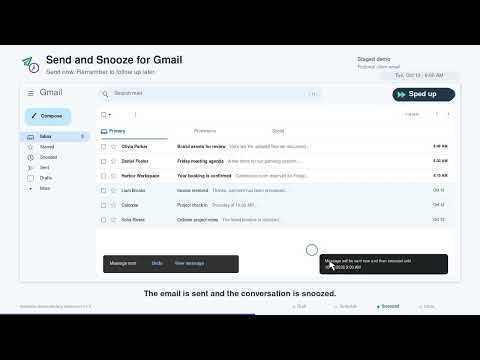
Send in Gmail and snooze the sent conversation with Gmail's own Snooze control.
One click sends and automatically snoozes your email according to your specifications. Saving multiple repetitive steps. Remember to follow up on the emails you send. Send and Snooze for Gmail adds a “Send + 🕔” button beside Gmail’s regular Send button. One click sends your email and snoozes the conversation until your chosen time, saving multiple repetitive steps. Set a default schedule, skip weekends, or choose a specific date and time. The current version is free, with no subscription or payment requirement. The extension processes email records locally in your Chrome profile and does not send those records to the developer. Choose your schedule • Set a default delay from 1 to 365 days. • Choose a different delay for an individual email. • Pick a specific date and time. • Skip certain days, such as Saturday and Sunday. • Return conversations at the original send time or a time of day you choose. Getting started Install the extension and refresh Gmail. Click “Send + 🕔” when you are ready to send. The extension sends your email, then applies Gmail’s own Snooze control to the conversation. Privacy The extension processes Gmail subjects, conversation identifiers, Gmail page addresses and operation diagnostics locally in your Chrome profile to send, snooze and verify the selected conversation. It does not send these records to the developer or use analytics, advertising or tracking services. Downloaded diagnostics can contain sensitive information; review them before sharing. Activity records expire 30 local calendar days after the requested snooze return date. Settings remain until changed or the extension is removed. Requirements and limits Use Chrome 120 or later with Gmail’s English desktop interface. Keep Chrome open until sending, snoozing and confirmation finish. Snoozing begins after an approximately 47 second buffer for Gmail’s Undo Send period and Sent updates. Gmail remains responsible for returning the conversation after Snooze is saved. Gmail layout changes, sign in prompts or background tab delays can interrupt the process. If snoozing fails, the email may already have been sent; check Sent and Snoozed before sending it again. Confirmation verifies that the conversation is in Snoozed; it does not independently read Gmail’s saved return time. The extension acts when you use its controls. Gmail’s ordinary Send button remains available. This is an independent extension and is not affiliated with or endorsed by Google. Gmail is a trademark of Google LLC.
0 out of 5No ratings
Details
- Version0.7.7
- UpdatedOctober 10, 2026
- Offered byHelpful apps from Eric
- Size70.45KiB
- LanguagesEnglish (United States)
- Developer
Email
Eric@Nashbar.us - Non-traderThis developer has not identified itself as a trader. For consumers in the European Union, please note that consumer rights do not apply to contracts between you and this developer.
Privacy

Send and Snooze for Gmail has disclosed the following information regarding the collection and usage of your data. More detailed information can be found in the developer's privacy policy.
Send and Snooze for Gmail handles the following:
This developer declares that your data is
- Not being sold to third parties, outside of the approved use cases
- Not being used or transferred for purposes that are unrelated to the item's core functionality
- Not being used or transferred to determine creditworthiness or for lending purposes
Support
For help with questions, suggestions, or problems, please open this page on your desktop browser