


Overview
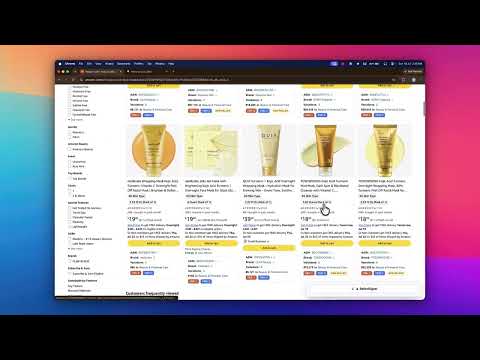
Amazon Seller Tool: Scores Amazon search pages against product criteria and shows BSR, Brand, FBA/FBM on every listing.
SellerSignal: The Ultimate Amazon Product Research Companion Accelerate your Amazon product sourcing, find winning white-label opportunities, and analyze search results page-by-page—directly on Amazon.com. SellerSignal is a lightweight, high-performance Chrome extension designed specifically for Amazon sellers. Instead of copying and pasting ASINs or keywords into bulky external apps, SellerSignal overlays real-time product analysis, criteria scoring, and critical listing metrics directly on your active Amazon search pages. 🚀 KEY FEATURES: • Criteria Scorecard: Instantly view a live scorecard summarising search results against trending product criteria (BSR, New Sellers and Reviews) via a sleek floating panel in the bottom-right. • Badges on Every Listing: Get high-level metrics overlayed on every listing at a glance: • Safe, Automatic Deep Scan: Sit back as SellerSignal do a deep scan of search result pages, loading listing details and offers panel data with built-in polite delays to prevent high requests. • Lightning Fast: Leverage your active browser session, keeping responses completely localised to your zip code, location, and currency settings. • Smart 24h Caching: Saves your API calls and bandwidth by caching ASIN data for 24 hours, letting you page back and forth instantly. 🛠️ HOW IT WORKS: 1. Install the extension. 2. Go to Amazon.com and search for any keyword or product niche. 3. SellerSignal will automatically load the floating scorecard panel and start overlays on the search listings. 4. Hover or scroll to watch the real-time scoring updates. Pause/resume the scan at any time using the control panel.
5 out of 52 ratings
Details
- Version1.2.1
- UpdatedJuly 19, 2026
- Size108KiB
- LanguagesEnglish
- DeveloperWebsite
Email
developer.akash8@gmail.com - Non-traderThis developer has not identified itself as a trader. For consumers in the European Union, please note that consumer rights do not apply to contracts between you and this developer.
Privacy

This developer declares that your data is
- Not being sold to third parties, outside of the approved use cases
- Not being used or transferred for purposes that are unrelated to the item's core functionality
- Not being used or transferred to determine creditworthiness or for lending purposes