

SellerApp: Supercharge your Amazon Sales

Tổng quan
SellerApp’s Chrome extension to Research and compare products on the go for Amazon Sellers
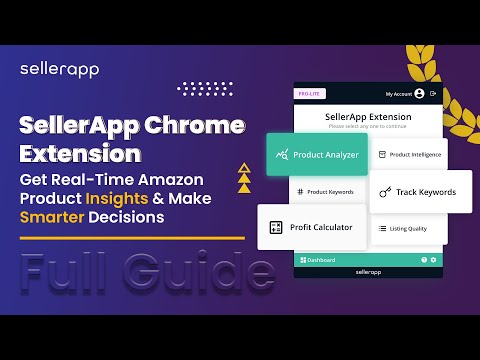
The SellerApp Chrome Extension is a valuable tool for Amazon sellers who want to research and compare products on the go. By analyzing products and keywords on Amazon pages, this extension provides detailed insights and allows sellers to make data-driven decisions about their products. With the free Amazon Seller Chrome Extension, you can track competitors' products, calculate profitability, improve your listing quality, conduct in-depth product analysis, perform keyword research, and much more. Here are the features offered by the SellerApp Chrome Extension: Product Analyzer Product Intelligence Product Keywords Track keywords Profit Calculator Listing Quality Review Insights Take advantage of the best Chrome extension for Amazon sellers, streamline your product research, optimize your listings, and ultimately increase your sales and profitability on Amazon. Product Analyzer The Product Analyzer page shows you different metrics for products in the Amazon search results. Here’s how it works. Search for a product on the Amazon search bar. Open the SellerApp Chrome Extension, and click on “Product Analyzer.” You’ll immediately get all the essential insights into the products in the SERP, such as: ASIN Product Name Parent ASIN Brand Category BSR Price Listing Price Ratings No. of Rating Reviews Opportunity Score Listing Health Images Buybox Est. Daily Orders Est. Daily Revenue Est. Monthly Orders You also get Average Prices, Average Orders, Average Ratings, and the Market OS(Market Opportunity Score) for the products. Product Intelligence Product Intelligence gives you in-depth insights into multiple key parameters about individual products. On the left side, you get some basic product details, including Opportunity score, BSR, Product Category, Brand, Estimated orders/day, and Estimated revenue/day. On the right side, you get multiple options to measure the product’s performance: Trends Product Trends shows you the trend on multiple metrics such as Offers, Price, Rank, Revenue, and Orders and helps you understand year-round demand for the product. Product Keywords The Product Keywords section shows all the keywords associated with the product. You can also access the Relevance Score, Search Volume, and CPC for each keyword. Keyword Tracking The keyword tracking tab in the SellerApp Chrome Extension shows you all the keywords you track for a particular product. And, for each keyword, it shows the following metrics: Number of Indexed products: This shows how many products are indexed for the specific product Page rank: On which page on Amazon SERP the product ranks Current position: What’s the current position of the product Position change: Shows any shift in position within a timeframe. Profit Calculator The Profit Calculator on SellerApp Chrome extension is a fast and easy way to determine whether a product is profitable. It’s available for both FBA and FBM. Just enter different costs, like Sales Price, Cost of goods sold, FBA cost, Shipping cost, and other costs, and the tool will give you the approximate Net Profit, Net Margin, and ROI of the product. Listing Quality Next, you get the Listing Quality feature. It analyzes the product listing you’re currently looking at and gives a weighted score based primarily on two factors: Discoverability: It shows how easily your product will be found on Amazon. Desirability: It is calculated based on different metrics that influence the product's conversion rate. The SellerApp free Amazon seller extension shows you a detailed score breakdown for each of these two categories to ensure your product listing will stand above the rest. Review Extractor Lastly, you get Review Extractor. This helps you scan through the reviews in the product listing to identify improvement opportunities. You can also download the reviews for further analysis. How to Install & Log In to SellerApp Chrome Extension? Installing and using the SellerApp Chrome Extension is a fairly easy process that hardly takes minutes. First, go to https://dashboard.sellerapp.com/register, and create an account. Once logged in, install the free SellerApp Chrome extension from Google Web Store. After that, pin the SellerApp Chrome Extension on the top right corner of your browser. Now, all you have to do is Open Amazon → search for a product → click on the extension, then sign in using your SellerApp credentials, and you are good to go. Using the SellerApp Chrome Extension, you can gain a significant advantage over your competitors by making informed decisions about your products. With features like Product Keywords, Keyword Tracking, Profit Calculator, and Listing Quality, you can streamline your product research, optimize your listings, and ultimately increase your sales and profitability on Amazon. So, if you're an Amazon seller looking to take your business to the next level, download the SellerApp Chrome Extension for free today!
4,6/5257 lượt xếp hạng
Chi tiết
- Phiên bản3.8.0
- Đã cập nhật2 tháng 4, 2026
- Kích thước2.32MiB
- Ngôn ngữEnglish
- Nhà phát triểnSellerAppTrang web
800 West El Camino Real, suit 180, Mountain View, CA, 94040 Mountain View, CA 94040 USEmail
support@sellerapp.com - Người bán phi thương mạiNhà phát triển này không tự nhận mình là người bán. Đối với người tiêu dùng ở Liên minh Châu Âu, xin lưu ý rằng các quyền của người tiêu dùng không được áp dụng trong hợp đồng giữa bạn và nhà phát triển này.
Quyền riêng tư

SellerApp: Supercharge your Amazon Sales đã công bố thông tin sau đây liên quan đến việc thu thập và sử dụng dữ liệu của bạn. Bạn có thể xem thêm thông tin chi tiết trong privacy policy của nhà phát triển.
SellerApp: Supercharge your Amazon Sales xử lý dữ liệu sau:
Nhà phát triển này tuyên bố rằng dữ liệu của bạn
- Không được bán cho bên thứ ba, ngoài những trường hợp sử dụng đã được phê duyệt
- Không được sử dụng hoặc chuyển nhượng cho các mục đích không liên quan đến chức năng chính của mặt hàng
- Không được sử dụng hoặc chuyển nhượng để xác định khả năng thanh toán nợ hoặc phục vụ mục đích cho vay
Hỗ trợ
Nếu bạn có câu hỏi, ý kiến đề xuất hoặc gặp vấn đề, vui lòng mở trang này bằng trình duyệt dành cho máy tính để được trợ giúp