

SelectorPass - Secure Password Manager
2 ratings
)
Overview
Secure password manager with precision CSS targeting and complete local storage
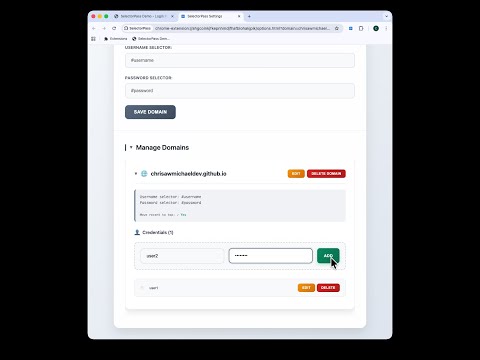
SelectorPass — Precision Password Manager with Enterprise-Grade Encryption Take full control of your passwords with SelectorPass, the Chrome extension that combines precision targeting, total privacy, and optional enterprise-grade encryption. Unlike cloud-based password managers, SelectorPass stores everything locally — no syncing, no servers, and zero data ever leaves your device. ⸻ 🧩 WHAT IT DOES SelectorPass securely stores and autofills passwords on any website — with developer-level precision and optional AES-256-GCM encryption. When other password managers fail on complex sites, SelectorPass lets you define custom CSS selectors to target login fields exactly. ⸻ 🔐 NEW: ENTERPRISE-GRADE ENCRYPTION • AES-256-GCM encryption with authenticated encryption for maximum security • PBKDF2 key derivation with 100,000 iterations for secure key generation • Per-credential encryption — choose which passwords to encrypt individually • Stateless security — master password required for each encrypted operation • Session-based management — automatic cleanup when browser closes Your most sensitive passwords get bank-level protection, while keeping everyday logins fast and accessible. ⸻ 🎯 WHY IT'S DIFFERENT • Complete local storage – all credentials stay on your device only • No cloud or servers – nothing synced or transmitted • No tracking or analytics – we don't monitor, log, or share anything • Manifest V3 compliant – modern, minimal, and secure • Optional encryption – secure sensitive accounts without slowing down daily use Your passwords never leave your computer. Period. ⸻ ⚙️ SMART, POWERFUL FEATURES • Precision CSS selector targeting – works even on tricky or dynamic sites • Multiple credentials per domain – separate work and personal logins • Real-time login status sync – seamless experience across all tabs • Smart domain detection – instantly identifies the current site • Auto-sort recent use – frequently used logins float to the top • Drag & drop reordering – organize your list exactly as you like • Collapsible interface – clean, compact, and easy to manage • 🔐 Visual encryption indicators – instantly see which credentials are protected ⸻ 🚀 QUICK SETUP 1. Visit any login page 2. Configure CSS selectors for username and password fields 3. Save your credentials (optionally encrypt sensitive ones) 4. Enjoy one-click autofill on future visits No clutter. No cloud. Just fast, precise control with optional enterprise-grade security. ⸻ 💪 BUILT FOR POWER USERS Ideal for developers, security professionals, and anyone who values control, privacy, and precision. Works flawlessly on sites where other password managers give up. Perfect for mixed environments — encrypt work credentials while keeping personal logins fast. ⸻ 🛡️ SECURITY FIRST • Fully offline operation with optional local encryption • Minimal permissions required • No network access for credential data • AES-256-GCM authenticated encryption for sensitive accounts • PBKDF2 key stretching prevents brute force attacks • Open source and transparent ⸻ ✨ KEY BENEFITS • Works on ANY website with custom selectors • Handles multiple accounts per site effortlessly • 100% offline and private • Optional per-credential encryption for sensitive accounts • Real-time sync between popup and options • Drag-and-drop organization for clarity • Persistent preferences and safe deletion ⸻ 📺 DEMO & RESOURCES 🎥 Demo video: https://www.youtube.com/watch?v=Lw2BCiFpCqY 💻 GitHub repository: https://github.com/chrisawmichaeldev/selectorpass 🧪 Test page: https://chrisawmichaeldev.github.io/selectorpass/demo.html ⸻ SelectorPass — the password manager that never phones home. Private. Precise. Powerful. Now with enterprise-grade encryption.
5 out of 52 ratings
Details
- Version2.0.1
- UpdatedNovember 26, 2025
- Offered bychris.aw.michael.dev
- Size51.26KiB
- LanguagesEnglish
- Developer
Email
chris.aw.michael.dev@gmail.com - Non-traderThis developer has not identified itself as a trader. For consumers in the European Union, please note that consumer rights do not apply to contracts between you and this developer.
Privacy

This developer declares that your data is
- Not being sold to third parties, outside of the approved use cases
- Not being used or transferred for purposes that are unrelated to the item's core functionality
- Not being used or transferred to determine creditworthiness or for lending purposes
Support
For help with questions, suggestions, or problems, visit the developer's support site