

Select AI

Overview
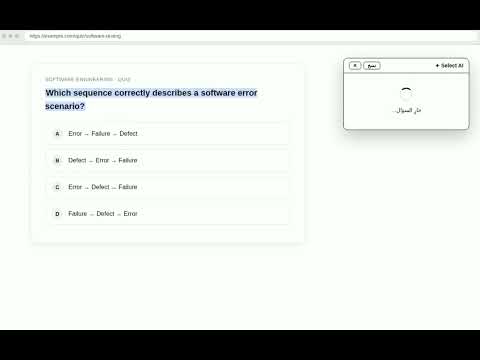
Select any text on a page and get an instant, short AI answer in a small popup. Close it with Ctrl+Q.
Select AI Stop switching tabs to look up answers. Select AI puts a smart assistant on every page you visit. How it works: Select any text on any webpage. A small button appears next to your selection. Click it, and the answer opens in a tidy, compact popup right on the page. Close it with one keystroke (Ctrl+Q or Esc) and keep reading. Why you'll love it: It answers multiple-choice questions the way you need them - the correct letter (A, B, C, or D), a brief explanation, and a confidence percentage. If the question has a picture, it reads the picture too, so image-based questions are handled just as easily as text. It keeps answers short and to the point. No long essays, just the answer and a simple explanation when you need it. The design is clean white and black, so it never distracts from what you're reading. The window is small, can be moved anywhere on the page, and includes a copy button. It works instantly with no setup and no accounts. Perfect for students preparing for exams, researchers, and anyone who reads a lot and wants quick, accurate explanations. Your selected text is only used to generate the answer and nothing else.
0 out of 5No ratings
Details
- Version1.0.1
- UpdatedOctober 10, 2026
- Offered byAbdullah
- Size15.0KiB
- LanguagesEnglish (United Kingdom)
- Developer
Email
ixw0@hotmail.com - Non-traderThis developer has not identified itself as a trader. For consumers in the European Union, please note that consumer rights do not apply to contracts between you and this developer.
Privacy

Select AI has disclosed the following information regarding the collection and usage of your data. More detailed information can be found in the developer's privacy policy.
Select AI handles the following:
This developer declares that your data is
- Not being sold to third parties, outside of the approved use cases
- Not being used or transferred for purposes that are unrelated to the item's core functionality
- Not being used or transferred to determine creditworthiness or for lending purposes