


Overview
Make 'see Note 12' clickable in SEC 10-K & TASE filings — the note opens verbatim, no AI. Highlight, annotate, compare.
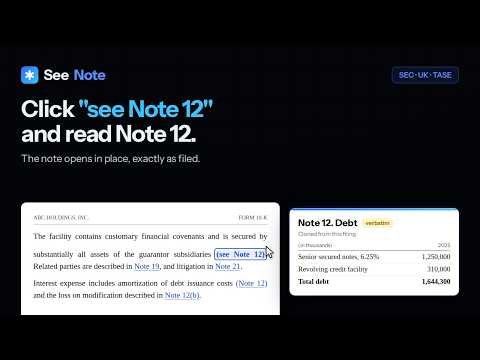
SeeNote turns every "(see Note 12)" cross-reference in a 10-K, 10-Q, 20-F or annual report into a clickable link. Click it and the referenced note opens in a popup — the exact text and tables the company filed, no AI, no summaries. Beside the notes: Key figures, the filing's headline numbers with each one linked to the place the filing prints it, and the company around the filing — its other filings, insiders and related-party disclosure. Works on SEC EDGAR (HTML & inline XBRL) and Tel Aviv / Maya (Hebrew PDF and iXBRL). Your first 3 filings are free — no card, no expiry. Install and open any 10-K to try it. KEY FIGURES A sidebar tab with the filing's headline numbers, read from the filing itself: revenue, gross profit, operating income, net income, diluted EPS, operating cash flow, capex, cash, equity and total debt, this period beside the comparative, with the change. Every number is a link to the place the filing prints it. SeeNote also computes gross margin, operating margin, free cash flow and net debt (for banks and insurers, return on equity, return on assets and equity to assets), each with its formula and its inputs as links. A number SeeNote cannot read with confidence shows "—" and the reason. It never guesses, and it writes no text of its own. Key figures works on EDGAR filings with inline XBRL, on Maya iXBRL reports, and on Maya PDF reports opened in the SeeNote Reader, where a statement is shown only when it agrees with its own totals. It is free on every filing, before and after the trial. A subscription adds all 28 ratios, short trend sentences, the largest moves with where the filing reports each one, and, on EDGAR, five years and eight quarters of history. THE COMPANY AROUND THE FILING More sidebar tabs beside the notes. Filing: where this filing sits among the company's other filings. Insiders (EDGAR): the reporting owners and their Forms 3, 4 and 5 and Schedules 13D and 13G. Related parties: where the filing gathers its related-party disclosure. Hover a tagged number in an inline XBRL filing for its card: what it is tagged as, its period and scale, and where else the filing reports it. A subscription adds History, the same note in an earlier filing beside the one you are reading, with a Redline of what changed. Every request these tabs make goes from your browser straight to the SEC or Maya, never to us, and "Company context" in Settings switches them all off. HIGHLIGHTS AND NOTES Highlights, notes and copy work on filings in the SeeNote Reader, on EDGAR HTML pages and on TASE inline-XBRL pages. Select the text on a page, or drag across a line in the Reader, and keep it: a coloured highlight in one of four colours, and a note of your own if you want one. The note opens in the same window the referenced notes use, so it drags, zooms and pins like everything else. Every mark collects in a Highlights tab in the sidebar, where you can filter them, jump back to the page, or copy them all out as text — each one quoted with your note beneath it. Highlights are free on every filing, including after the trial: the trial counts notes you open, not marks you make. They are stored on your own device and are never uploaded — the quote and your note stay in the browser. Exactly what a mark holds, and where: the passage you quoted, your note, the filing's title and address, and the time you last changed it. All of it is kept unencrypted in Chrome's local storage on this device — the same place the extension's settings live. It is never synced to another computer, never transmitted to us or to anyone else, and it is deleted along with everything else when you remove the extension. Anyone with access to your Chrome profile can read it, so treat a mark the way you would treat a note written in the margin of a printout. WHAT IT COSTS SeeNote is a paid extension with a free trial, and here is exactly what that means, because a store listing is a bad place to be vague about it: - Your first 3 filings are completely free. Every note in them opens, as many times as you like. No credit card, and no expiry date — the trial is spent by reading, not by waiting, so it is still there months later if that is when you next open a 10-K. The bundled demo filing is free forever and counts towards nothing. - After those 3 filings, SeeNote keeps finding, underlining and counting every cross-reference in every filing, free, for as long as you use it. Clicking one shows the upgrade prompt instead of opening the note. There are no daily or monthly limits — there are no meters at all. - A subscription opens the notes again everywhere: $15/month or $129/year. It also opens History and the rest of the Key figures tab. - Highlights and your own notes are outside all of this. They are free on every filing, before and after the trial, and always will be. So are Key figures' headline numbers and four ratios, and the company tabs' lists. WORKS ON - SEC EDGAR: 10-K, 10-Q, 20-F and 40-F filings on sec.gov, in both the classic HTML view and the inline XBRL viewer - Tel Aviv Stock Exchange: Hebrew PDF filings opened from Maya, and the iXBRL filings Maya renders - Any filing PDF you open in the SeeNote Reader, whatever site it came from - Install-time access is limited to sec.gov and TASE/Maya. Opening a PDF from another site asks for that one site, once. - Open any filing PDF in the SeeNote Reader (toolbar button, right-click a PDF link, or drag-and-drop) - In the Reader, the referenced note pops up as the actual page image — tables and typography intact - Text-layer PDFs only; scanned PDFs are detected and reported. Chrome only. - References become dotted-underline links as you scroll - Notes open in place — tables preserved exactly as filed - Notes open in a movable, resizable window — zoom 70–200%, pin up to three for side-by-side comparison - A collapsible sidebar lists every note; filter, click to open, double-click to jump - Hover any reference for a three-line preview; copy any note verbatim (tables paste into spreadsheets) - Every reference is resolved from the filing's own structure, with confidence signaling - References to other filings are named as such, and opened in the right register - If SeeNote can't resolve a reference, it says so - Select text on an EDGAR HTML or TASE inline-XBRL page, or drag across a line in the Reader: highlight it in four colours, attach a note, and find every mark in the sidebar's Highlights tab — filter, jump, or copy them all as text - Highlights and notes are free on every filing and stay on your device - Key figures: the filing's headline numbers and four ratios in a sidebar tab, each linked to the place the filing prints it, free on every filing - No account, and what you read is never sent to us. The trial count and your license key are checked with our server; anonymous usage counts are strictly opt-in. Every request is listed at seenote.co/privacy. WHAT'S NEW IN 2.0.0 Key figures, a new sidebar tab: the filing's headline numbers, read from the filing itself, each one a link to the place the filing prints it. - Revenue, gross profit, operating income, net income, diluted EPS, operating cash flow, capex, cash, equity and total debt: this period beside the comparative, with the change. Banks and insurers get the lines that fit them. - Computed by SeeNote: gross margin, operating margin, free cash flow and net debt (for banks and insurers, return on equity, return on assets and equity to assets), each with its formula and its inputs as links. - A number SeeNote cannot read with confidence shows "—" and says why. It never guesses. - On EDGAR filings with inline XBRL, on Maya iXBRL reports, and on Maya PDF reports opened in the SeeNote Reader, where a statement is shown only when it agrees with its own totals. - Free on every filing, before and after the trial. - With a subscription: all 28 ratios, up to four sentences on what moved, the largest moves with where the filing reports each one, and on EDGAR five years and eight quarters of history (with the optional data.sec.gov permission). - No new request: the tab reads the page you have open. "Company context" in Settings switches it off. Also new since 1.1.0 The company around the filing, in new sidebar tabs beside Notes: - Filing: where this filing sits among the company's other filings on EDGAR — the prior period, earlier annual reports going back years, this year's quarterly reports, the 8-Ks filed since the last annual report, and the proxy statement. Enter opens one in SeeNote. On a Maya report, the tab lists the report and the reports it cites. - Insiders (EDGAR): the company's reporting owners as EDGAR lists them, with their Forms 3, 4 and 5 and Schedules 13D and 13G. Open an owner for their card: the companies they file for, their role at each as EDGAR states it, and their filings. - Related parties: where the filing gathers its related-party disclosure — the related-party note, Item 13 and the proxy sections it points to, regulation 22 in a Maya annual report, and tagged related-party amounts. Found by the filing's own structure and a text search, and labelled as exactly that. On EDGAR, insiders' names that appear there are marked. - Number cards: hover a tagged number in an inline XBRL filing, on EDGAR or Maya, to see what it is tagged as, for which period and scale, and where else the filing reports it. - With a subscription (EDGAR): History shows the same note in an earlier filing beside the one you are reading — last year's, last quarter's, or any earlier annual report — with the evidence for the pairing and a Redline of what changed. "What changed" lists every note that is new, gone or changed since the prior filing. Each related-party section walks back year by year, and insiders' forms and a number's history across filings can be read. - Optional, and never asked for at install: allow data.sec.gov in Settings, and the Filing tab reads the company's list from the SEC's data service, and a number card can show that number's history. - Every request these tabs make goes from your browser straight to the SEC or Maya, never to us. "Company context" in Settings switches all of it off. seenote.co/privacy lists every request. And: - Lettered sub-notes: a reference to "Note 13A" now opens note 13, labelled as its sub-section A, when that filing's note 13 has one. On EDGAR and Maya iXBRL pages the note opens scrolled to that sub-section. - A trial filing is spent only when SeeNote shows you a note, or a list of notes to choose from. A reference it can't resolve, or one that points to another filing, costs nothing. A Maya report counts as one filing, however its attachments are opened. - SeeNote now opens the notes of many more 20-F and 40-F annual reports, including IFRS-style headings and dotted notes such as "Note 6.2". - In a 10-Q, a reference to a note in the annual report now says it points to another filing, instead of opening the quarterly's own note with the same number. - Settings says whether your license key was refused or just couldn't be checked, and can check it again or remove it. A key the license server refuses is set aside rather than deleted, and comes back if a later check accepts it. "Manage your subscription" in the popup now takes you to where you manage it, not to a new checkout. - Hebrew titles, quotes and notes read right to left. The Reader copes better with long PDFs and slow downloads. Highlights made in two tabs of the same filing merge instead of overwriting each other. - Plus many smaller fixes to reference matching, the Reader, highlights and accessibility.
0 out of 5No ratings
Details
- Version2.0.2
- UpdatedOctober 27, 2026
- FeaturesOffers in-app purchases
- Size1.19MiB
- Languages2 languages
- DeveloperWebsite
Email
hello@seenote.co - Non-traderThis developer has not identified itself as a trader. For consumers in the European Union, please note that consumer rights do not apply to contracts between you and this developer.
Privacy

SeeNote: 10-K Footnotes & SEC Filing Reader has disclosed the following information regarding the collection and usage of your data. More detailed information can be found in the developer's privacy policy.
SeeNote: 10-K Footnotes & SEC Filing Reader handles the following:
This developer declares that your data is
- Not being sold to third parties, outside of the approved use cases
- Not being used or transferred for purposes that are unrelated to the item's core functionality
- Not being used or transferred to determine creditworthiness or for lending purposes