


Pangkalahatang-ideya
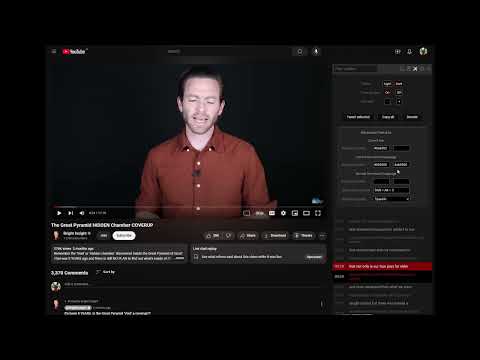
Save time watching youtube videos by filtering their subtitles and skipping uninteresting parts.
Skip the boring with Seek Subtitles! Save time, enhance your YouTube experience, and boost your language learning. Unleash the power of Seek Subtitles to streamline your YouTube viewing. Effortlessly filter subtitles, skip uninteresting parts, and display subtitles in two languages simultaneously - perfect for language learners. Whether you're into talk shows, podcasts, captivating lectures, or brushing up on a new language, Seek Subtitles is your ultimate companion. Transform YouTube subtitles into a sleek, scrollable, and searchable format. Dive straight into the most engaging content with ease. Say goodbye to lengthy intros, interludes, and filler fluff. For speech-heavy videos, read along as the text synchronizes seamlessly with the video progress, enhancing comprehension and retention. Key Features: - Subtitle Filtering: Effortlessly filter subtitles to skip over uninteresting or repetitive content. - Dual Subtitles: Select a second language to view two subtitles simultaneously, ideal for language learning and practice. - Bookmark Favorite Lines: Click on timestamps to bookmark memorable quotes or moments. - Customizable Interface: Toggle between Light and Dark themes, adjust font size, and control timestamp visibility. - Easy Access: Open and close the subtitle panel with a button in the video controller or a convenient shortcut. If you enjoy using Seek Subtitles, please consider giving us a five-star rating! Feeling generous? Show your support by clicking the Donate button. Thank you! Got feedback or suggestions? Reach out to us via email for prompt assistance and improvements. Update 02/09/2026 - Search tolerance - Bookmarks notes - optimizations Update 11/09/2024 - Advanced features: line colors, shortcut, second language Update 08/12/2024 - youtube bug fix Update 07/26/2023 - new buttons and localization - bug fixes Update 6/15/2020 - bug fixes Update 4/7/2020 - bookmark lines - copy all lines Update 2/26/2019 - select and tweet, copy Update 2/13/2019 - timestamps switch - change font size - show captions above the preview thumbnail on the seek bar
4.2 sa 5162 rating
Mga Detalye
- Bersyon1.4.0
- Na-updateMarso 7, 2026
- Iniaalok ngJure Rajer
- Laki299KiB
- Mga Wika25 (na) wika
- Developer
Email
jure.rajer@gmail.com - Hindi traderHindi tinukoy ng developer na ito ang sarili bilang trader. Para sa mga consumer sa European Union, pakitandaang hindi naaangkop ang mga karapatan ng consumer sa mga kontrata sa pagitan mo at ng developer na ito.
Privacy

Ipinapahayag ng developer na ito na ang iyong data ay
- Hindi ibinebenta sa mga third party na hindi kabilang sa mga naaprubahang sitwasyon ng paggamit
- Hindi ginagamit o inililipat para sa mga layuning hindi nauugnay sa pangunahing functionality ng item
- Hindi ginagamit o inililipat para tukuyin ang pagiging creditworthy o para sa mga layunin ng pagpapautang
Suporta
Para sa tulong sa mga tanong, suhestyon, o problema, pakibuksan ang page na ito sa iyong desktop browser