

SecurePass Generator
1 rating
)
Overview
Generate cryptographically secure passwords (random, memorable, PIN) locally with customizable options and a privacy-first design
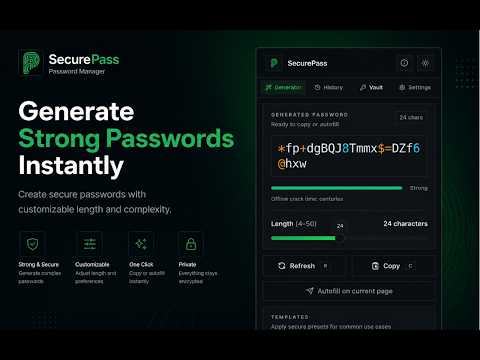
SecurePass Generator — modern, privacy-first password generation in your toolbar. SecurePass Generator creates cryptographically secure passwords locally in your browser. Choose between three generator modes — Random (character-based), Memorable (word-based passphrases), and PIN — and customize length, character classes, symbol sets, separators, and capitalization. All generation uses the Web Crypto API (crypto.getRandomValues()) with rejection sampling to avoid bias; nothing is sent to a server. Key features - Cryptographic randomness: Uses Web Crypto API + rejection sampling for unbiased secure random generation. - Three generator modes: Random (4–50 chars), Memorable passphrases (2–6 words), and PIN (4–12 digits). - Full customization: length, uppercase/lowercase, numbers, selectable symbol sets (Basic/Extended/Safe/Custom), separators, capitalization. - One-click actions: Generate, Copy, Auto-fill (content script), and optional History with encrypted entries. - Persistent preferences: Settings stored via Chrome Storage and restored across sessions. - Lightweight, modern UI: compact popup with dark mode, colored icons and subtle animations for a polished experience. - Privacy-first: All operations run locally; generated passwords and autofill data are never transmitted. What’s new in v1.2.2 (2025-09-26) - New About page with version, license, permissions, developer info, and quick links to GitHub and the Chrome Web Store. - Header polish: GitHub and “Rate us” icons added; icons receive subtle color + hover animations. - UI improvements: updated font to Alan Sans, tightened spacing/padding, improved tab icon visuals and animations. - Security & support copy clarified: explicit local-only generation and encrypted local history. - UX tweaks: scrollbars hidden for a cleaner popup, alignment and responsive fixes, and the app icon now appears in About. - Misc: manifest description updated and small bug/packaging fixes. Permissions & privacy - Permissions used: `storage`, `clipboardWrite`, and `activeTab` (used only for autofill). - Privacy-first: All password generation happens locally in the browser. The extension does not collect or transmit generated passwords. Optional history entries are stored locally and encrypted. Contact: rajeshwarkashyap5@gmail.com How to use (quick) 1. Click the extension icon → pick a tab: Random, Memorable, or PIN. 2. Adjust options (length, symbols, words) → click Generate. 3. Click Copy to copy to clipboard or Auto-fill to fill the active form field. Support & source - GitHub: https://github.com/work-rjkashyap/password-ganerator - Chrome Web Store: https://chromewebstore.google.com/detail/securepass-generator/iillkojencnommaljcgiommobneopafa - Email: rajeshwarkashyap5@gmail.com --- Short GitHub release note (paste into a GitHub release) v1.2.2 — 2025-09-26 Highlights - Add modern About page with quick links and metadata (version, license, permissions, developer). - Header improvements: add GitHub and Chrome Web Store (Rate us) icons. - UI polish: Alan Sans font, colored icons, subtle hover/scale animations, tightened spacing and responsive fixes. - Security & docs: clarified local-only generation, rejection sampling details, and encrypted history note. - UX: hide scrollbars for a cleaner popup, fix alignment/padding, show app icon in About.
5 out of 51 rating
Details
- Version1.2.5
- UpdatedJune 1, 2026
- Offered byRajeshwar Kashyap
- Size987KiB
- LanguagesEnglish
- Developer
Email
rajeshwarkashyap5@gmail.com - Non-traderThis developer has not identified itself as a trader. For consumers in the European Union, please note that consumer rights do not apply to contracts between you and this developer.
Privacy

This developer declares that your data is
- Not being sold to third parties, outside of the approved use cases
- Not being used or transferred for purposes that are unrelated to the item's core functionality
- Not being used or transferred to determine creditworthiness or for lending purposes
Support
For help with questions, suggestions, or problems, please open this page on your desktop browser