

SecureDL – Password-protected downloads

Overview
Save downloads already password-protected. PDFs open in Preview; other files unlock in any browser. 100% local.
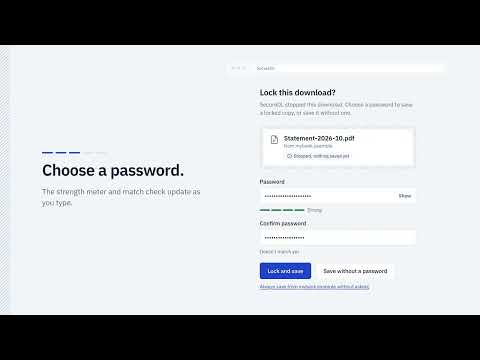
Bank statements, tax forms, ID scans, contracts… They download to your Desktop or Downloads folder with no password, and they stay there. SecureDL spots sensitive downloads as they start, stops them before anything is saved, and asks: lock it with a password? Or right-click any link → "Download with password". The file is downloaded into memory, encrypted on your device, and only the locked version is saved. HOW IT OPENS (no app to install) • PDFs are saved as standard AES-256 password-protected PDFs. • Every other file type is saved as a self-unlocking .html file (AES-256-GCM, PBKDF2 with 600,000 iterations). Double-click and type the password: the file opens right in your browser and stays locked. You can save an unlocked copy if you need to open it in another app. Works on Mac, Windows, Linux and phones.ac, Windows, Linux and phones. FEATURES • Automatic detection: asks when documents & images (or every file) start downloading • "Always save from this site without asking" for sites you trust • Works with downloads that pages build themselves, too • "Recent downloads" shows what happened to each download and why • Right-click any link, image or video → Download with password • Lock a file that's already on your computer • Uses the page you're on to fetch the file, so downloads from sites you're signed in to still work CHECKED BEFORE SAVING • Every locked file is test-opened with your password and compared with the original before it's saved • Refuses bot-check, login and error pages, so you never get a locked junk file • Refuses programs disguised as documents (e.g. an .exe named invoice.pdf) • Password confirmation and weak-password warnings • Never overwrites an existing file PRIVACY • Everything happens locally in your browser. No servers, no accounts, no analytics, no tracking. • Asks for no website access at install. It uses the tab you right-click in, and asks per site only if needed. • Open source: https://github.com/ranvijayj/secure-browser-download IMPORTANT: there is no password recovery. If you forget the password, the file cannot be opened. Keep the password in your password manager. Contact Developer contact email (Account page, shown publicly): SecureDL-chrome@protonmail.com Support URL: https://github.com/ranvijayj/secure-browser-download/issues
0 out of 5No ratings
Details
- Version1.4.1
- UpdatedNovember 8, 2026
- Offered byRanvijay Jamwal
- Size360KiB
- LanguagesEnglish
- Developer
Email
SecureDL-chrome@protonmail.com - Non-traderThis developer has not identified itself as a trader. For consumers in the European Union, please note that consumer rights do not apply to contracts between you and this developer.
Privacy

This developer declares that your data is
- Not being sold to third parties, outside of the approved use cases
- Not being used or transferred for purposes that are unrelated to the item's core functionality
- Not being used or transferred to determine creditworthiness or for lending purposes
Support
For help with questions, suggestions, or problems, visit the developer's support site