

Secure Password Generator
3 ratings
)
Overview
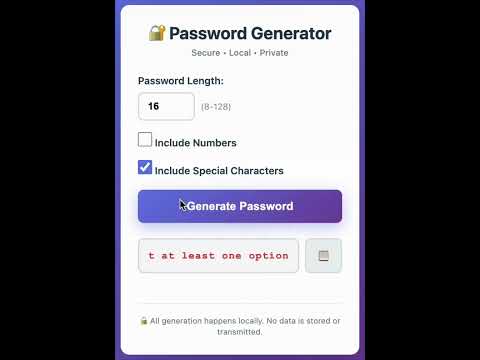
Generate cryptographically secure passwords locally in your browser. No data stored, no network requests.
🔐 Secure Password Generator - Generate strong passwords instantly! Features: • Cryptographically secure password generation • 100% local - no data stored or transmitted • Customizable length (8-128 characters) • Toggle numbers and special characters • One-click copy to clipboard • Beautiful, modern interface • Zero permissions required • Works completely offline Privacy & Security: • All generation happens locally in your browser • Uses crypto.getRandomValues() API (same security as HTTPS) • No network requests • No data collection • No tracking • Open source code Perfect for: • Creating secure passwords for new accounts • Generating random passwords for password managers • Quick password generation on-the-go How to Use: 1. Click the extension icon 2. Set your desired password length 3. Toggle options as needed 4. Click "Generate Password" 5. Copy and use! Remember: Use a password manager to store your generated passwords securely. Created by: Inor Wang | https://github.com/inor-w | https://inorw.com/ | https://www.linkedin.com/in/inorwang/
5 out of 53 ratings
Details
- Version1.0.0
- UpdatedFebruary 5, 2026
- Offered byinorwang
- Size7.79KiB
- LanguagesEnglish (United States)
- Developer
Email
inorwang@gmail.com - Non-traderThis developer has not identified itself as a trader. For consumers in the European Union, please note that consumer rights do not apply to contracts between you and this developer.
Privacy

This developer declares that your data is
- Not being sold to third parties, outside of the approved use cases
- Not being used or transferred for purposes that are unrelated to the item's core functionality
- Not being used or transferred to determine creditworthiness or for lending purposes