

Secure Gmail Sender Verifier

Overview
Protects against phishing and spoofing by verifying Gmail senders against an allow-list.
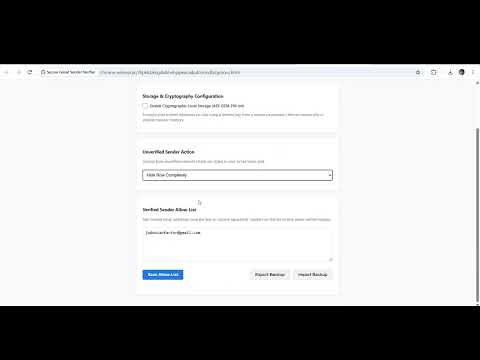
Phishing and email spoofing are among the most common vectors for cyber attacks. The Secure Gmail Sender Verifier adds a robust, on-device layer of defense directly into your Gmail interface, allowing you to instantly distinguish verified, trusted senders from potential threats. By matching sender addresses against your customized allow-list, the extension dynamically filters your inbox view, highlighting trusted contacts and giving you clear visual alerts for unverified external senders. 🛡️ Key Security Features Verified Sender Badging (Free): Automatically affixes green ✓ Verified badges to recognized email addresses and ⚠ External warning tags to unverified incoming rows. Flexible Inbox Control Actions: Dim Row (Free): Fades unverified emails to 35% opacity so you can scan them quickly. Collapse Row (Pro): Fades unverified rows to 8% opacity to emphasize verified correspondence. Hide Row (Pro): Completely removes unverified senders from your active DOM view for an ultra-focused inbox. Bank-Grade Client-Side Encryption (Pro): Keep your verified contact list entirely confidential. When Encrypted Mode is enabled, your allow-list is encrypted on local disk using the native Web Crypto API (AES-GCM 256-bit with PBKDF2 derived keys and 100,000 iterations). 🔒 100% Privacy-First Architecture Zero Remote Servers: All cryptographic processes, list management, and DOM parsing occur entirely within your local browser sandbox. No Telemetry or Trackers: We do not collect, store, or transmit your emails, browsing habits, or configurations. No Third-Party Access: Your allow-list remains entirely yours, isolated on your physical machine. ⚙️ How It Works Install the Extension: Add the verifier to Chrome. Build Your Trust-List: Add trusted domain names or individual email addresses (e.g. billing@trustedcompany.com or trustedpartner.com) in the settings dashboard. Secure Your Inbox: Gmail instantly badges your verified senders with green tags and applies your chosen filter rule to external messages. Optional Pro Vault: Activate Pro with your lifetime unlock key to enable complete row hiding and local AES-GCM disk encryption. 📋 Permissions Explained To maintain absolute transparency, here is exactly why permissions are requested: storage: Required to securely persist your allow-list and preference settings locally on your device. https://mail.google.com/*: Required to inspect inbox sender elements and render verified badges and warning banners directly in the Gmail web interface. 💻 Technical Specifications Platform: Chrome Extension Manifest V3 Cryptography: AES-GCM (256-bit key size), PBKDF2 (100,000 iterations), SHA-256 Compatibility: Optimized for Gmail Desktop Web UI Pro Code (beta): J+A092526
0 out of 5No ratings
Details
- Version1.1.0
- UpdatedOctober 28, 2026
- FeaturesOffers in-app purchases
- Offered byDataCash
- Size15.68KiB
- LanguagesEnglish
- DeveloperJaden Smith
34294 Bridgestone Ln Bluemont, VA 20135-1933 USEmail
jadonianfactor@gmail.comPhone
+1 540-216-1576 - TraderThis developer has identified itself as a trader per the definition from the European Union and committed to only offer products or services that comply with EU laws.
Privacy

This developer declares that your data is
- Not being sold to third parties, outside of the approved use cases
- Not being used or transferred for purposes that are unrelated to the item's core functionality
- Not being used or transferred to determine creditworthiness or for lending purposes