


Overview
Create seating charts for your classroom
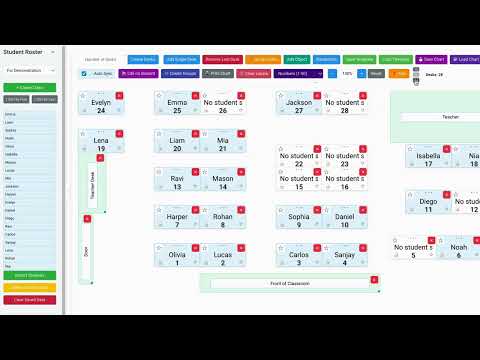
Seating Chart Generator for Google Classroom Create, customize, and manage interactive seating charts for your Google Classroom. Randomize seats, form groups, and keep track of student participation—all within your browser. Detailed Description Seating Chart Generator is a powerful tool for teachers that seamlessly integrates with Google Classroom to help you create and manage classroom seating arrangements. Design custom layouts, randomize student seating, track participation, and more—all while keeping your student data private and secure. Key Features: 🎨 Flexible Layout Design Create custom seating arrangements with individually placeable desks Add classroom objects like teacher's desk, whiteboard, doors, and other room elements Rotate desks and objects to match your actual classroom layout Save multiple layout templates to reuse across different classes 👥 Student Management Import students directly from your Google Classroom roster with one click Manually add or remove students as needed Assign and reassign students to specific seats Sort student lists by first or last name Highlight which students are assigned to which desks 🔄 Randomization & Groups Randomize student seating with a single click Designate priority seats for students with special needs Lock specific student assignments while randomizing others Create random student groups of any size Visually group desks together for collaborative work 📊 Class Participation Randomly select students to call on during class Track which students have been called on Reset participation tracking as needed 🏷️ Custom Labels Add custom labels to desks (numbers, letters, shapes, or playing cards) Use labels for organizing groups, activities, or assessments 🖨️ Printing & Display Print professional-looking seating charts for substitutes or your records Switch to a clean "display mode" that hides editing controls Zoom and pan to focus on specific areas of your classroom 💾 Secure Data Storage All data is stored locally in your browser Optional Chrome sync for accessing your seating charts across devices No student data is ever sent to external servers Perfect for: Elementary, middle, and high school teachers College professors managing larger classrooms Substitute teachers needing quick classroom organization Education administrators creating standardized seating arrangements Privacy Commitment: Seating Chart Generator respects your privacy and your students' privacy. All data is stored locally in your browser and never transmitted to any external servers. When you use Chrome sync, your data is only synchronized through Google's secure sync service. Download Seating Chart Generator today and bring order and organization to your classroom seating arrangements! Educational Use Notice: IMPORTANT: Educators should obtain approval from their school or district IT department before using this extension. While the Seating Chart Generator is designed with educational privacy in mind, each institution may have specific policies regarding Chrome extensions and student data management. It is the user's responsibility to verify compliance with local policies and obtain necessary approvals before using this extension in an educational setting. DATA USAGE: This extension only processes student names visible in Google Classroom for creating seating charts. It stores all data locally in your browser and does not transmit student information to any external servers. No additional student data beyond names is processed or stored. Updates 5/26/2025: Moved "Launch Seating Charts" button to not interfere with buttons on google classroom. Minor UI updates like hover effects added to buttons and padding added to buttons. Updates 4/28: Security Update Grouping functionality updated to click on students who are absent and edit groups after they are created. Updates 3/17: Add tabs to hide and show Student Roster and Control Panel. Added AutoSync Feature Create Classes Manually feature Minor UI and visual improvements Minor Bug fixes Update 9/18 Bug fixes
5 out of 51 rating
Details
- Version2.0.2
- UpdatedDecember 3, 2025
- Size223KiB
- LanguagesEnglish (United States)
- DeveloperWebsite
Email
classcodeconnect@gmail.com - Non-traderThis developer has not identified itself as a trader. For consumers in the European Union, please note that consumer rights do not apply to contracts between you and this developer.
Privacy
Seating Chart Generator has disclosed the following information regarding the collection and usage of your data. More detailed information can be found in the developer's privacy policy.
Seating Chart Generator handles the following:
This developer declares that your data is
- Not being sold to third parties, outside of the approved use cases
- Not being used or transferred for purposes that are unrelated to the item's core functionality
- Not being used or transferred to determine creditworthiness or for lending purposes
Support
For help with questions, suggestions, or problems, visit the developer's support site