

Search Inside YouTube Videos & Download Transcripts - YoutubeMore

Overview
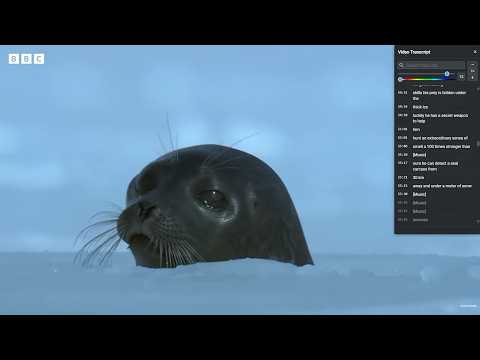
Search inside any YouTube video by word, follow the transcript word by word in a side panel, download it, and switch languages.
YoutubeMore is a free Chrome extension that lets you search inside a YouTube video. Type a word, name, or phrase, jump to the moment it is said, follow the transcript word by word in a side panel, download it as text, switch auto-translated subtitle languages, and speed up playback — without leaving the watch page. Search inside a YouTube video Need to find where something is said in a long YouTube video? Search the transcript for a word, name, or phrase. Match counts help you step through every mention. This is text search inside the video’s captions, not another search for videos on YouTube. Click a match to jump to that moment. YouTube transcript side panel Follow the captions as you watch. YoutubeMore puts the full YouTube transcript beside the player, highlights the current line and the word being spoken, and auto-scrolls to keep that text in view (auto-scroll pauses while you scroll the panel, then resumes when your pointer leaves it). Click any line or word to jump to that moment. A transcript button sits in the YouTube™ player controls. Download the YouTube transcript Save the transcript as text when you want a copy for notes, study, or quotes. YouTube’s built-in panel is made for reading along; YoutubeMore also lets you take the text with you. Switch auto-translated subtitle languages Change the transcript language without digging through YouTube’s caption menu. Open the language list, star the languages you use, and keep up to five favorites next to the title. One click switches the whole transcript, including auto-translated languages. Search, auto-scroll, and word highlight follow the language you pick. The panel still opens in the video’s own language; your favorites are there when you want to switch. Speed up YouTube videos Change playback speed from the panel in one click, or with the + / − keys, including speeds above YouTube’s usual limit (1×–4×). Useful when you want a faster lecture, or to slow a line down and read along. Panel customization Drag and resize the transcript panel anywhere on the page. Adjust font size and color so the text is comfortable to read on long videos. Who it’s for Students, researchers, language learners, and anyone who wants to treat a YouTube video like a searchable document. How to use 1. Open a YouTube™ watch page. 2. Click the YoutubeMore button in the player controls. 3. Type a word into the transcript search box, or read along, click a line to jump, or download the transcript. 4. Switch caption or auto-translate language from the panel header. 5. Use the panel or the + / − keys to change speed (when the page isn’t focused on a text field). FAQ How do I search inside a YouTube video for a specific word? Open the video, click the YoutubeMore button, and type the word into the transcript search box. Click a match to jump to that moment. How do I get the transcript of a YouTube video as text? Open the panel and download the transcript. You can also read it beside the player and copy the parts you need. How is this different from YouTube’s built-in transcript? YouTube’s own transcript is useful, but it is tucked in the description, has limited search, and has no download button. YoutubeMore puts a searchable, word-by-word, draggable panel on the watch page, with language favorites, speed controls, and transcript download. What’s an easy way to switch a YouTube auto-translated subtitle language? Open the panel, star the languages you use, and switch with one click from the header. Auto-translated languages are included. How do I speed up a YouTube video with one click? Use the speed control in the panel, or press + / − when you aren’t typing in a field. Speeds go from 1× to 4×. Can I follow the transcript word by word while watching? Yes. The current line and word are highlighted, and the panel auto-scrolls as the video plays. Can I change how the panel looks? Yes. Drag and resize it, and adjust font size and color. Does YoutubeMore need an account? No. It runs in your browser on YouTube™ pages. It requests transcript data for the video you’re watching so the panel can display captions. It does not require you to sign in to YoutubeMore. Privacy notes YoutubeMore runs in your browser on YouTube™ pages. It requests transcript data for the video you’re watching so the panel can display captions. It does not require you to sign in to YoutubeMore. YouTube is a trademark of Google LLC. Use of this trademark is subject to Google Permissions.
5 out of 52 ratings
Details
- Version2.0.4
- UpdatedNovember 19, 2026
- Size167KiB
- Languages7 languages
- DeveloperWebsite
Email
abdullahyildiz111@gmail.com - Non-traderThis developer has not identified itself as a trader. For consumers in the European Union, please note that consumer rights do not apply to contracts between you and this developer.
Privacy

This developer declares that your data is
- Not being sold to third parties, outside of the approved use cases
- Not being used or transferred for purposes that are unrelated to the item's core functionality
- Not being used or transferred to determine creditworthiness or for lending purposes
Support
For help with questions, suggestions, or problems, please open this page on your desktop browser