

SDR Web Radio
1.7(
6 ratings
)ExtensionJust for Fun340 users

Overview
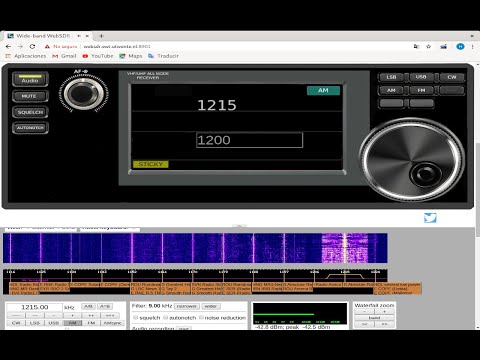
SDR Web Radio, a Chrome extension WebSDR companion
This Chrome extension firstly intent to activate the audio for WebSDR.org server pages in the chrome browser, but you can also make use of Mute, Squelch, Autonotch, as well as buttons to control frequency and volume and modulation mode selectors. Some features like Sticky might not work in modified websdr.org standard server pages. The mouse wheel function does not work on touch screens at least you install a plugin program on Windows like TouchMe Gesture Studio. On laptops you could need to activate the touch pad virtual scrolling.
1.7 out of 56 ratings
Details
- Version0.7.0
- UpdatedAugust 26, 2026
- Offered byRiveraSoftWare
- Size362KiB
- LanguagesEnglish (United States)
- DeveloperRiveraSoftWare
Barrio San Cristobal, Táchira 5001 VEEmail
riverasoftware2020@gmail.com - Non-traderThis developer has not identified itself as a trader. For consumers in the European Union, please note that consumer rights do not apply to contracts between you and this developer.
Privacy

Manage extensions and learn how they're being used in your organization
The developer has disclosed that it will not collect or use your data. To learn more, see the developer’s privacy policy.
This developer declares that your data is
- Not being sold to third parties, outside of the approved use cases
- Not being used or transferred for purposes that are unrelated to the item's core functionality
- Not being used or transferred to determine creditworthiness or for lending purposes
Support
For help with questions, suggestions, or problems, please open this page on your desktop browser